The post Office Management: definition, types, process, jobs and best practices appeared first on HKT Consultant.
]]>Office management is the technique of planning, organizing, coordinating and controlling office activities with a view to achieve business objectives and is concerned with efficient and effective performance of the office work. The success of a business depends upon the efficiency of its office. The volume of paper work in offices has increased manifold in these days due to industrialization, population explosion, government control and application of various tax and labour laws to any business enterprise. Efficiency and effectiveness which are key words in management are achieved only through proper planning and control of activities, reduction of office costs and coordination of all activities of business.
“Office management is manipulation and control of men, methods, machine and material to achieve the best possible results-results of highest possible quality with the expenditure of least possible effect and expense, in the shortest practicable time, and in a manner acceptable to the top management.”— Harry H. Wylie. This definition stresses the utilization of resources of business like material, methods etc. to achieve the objectives and results in a best and cheapest way and in a minimum possible time.
“Office management is the art of guiding the personnel of the office in the use of means appropriate to its environment in order to achieve its specified purpose.”— Mills and Standinhford. According to this definition, a proper understanding of the objective purpose is necessary so that all efforts and activities are directed in its achievement Environment where office work is to be performed is provided by management after proper planning. Environment means surroundings where employees of an enterprise operate. It includes physical factors like location, layout, lighting temperature, ventilation, cleanliness etc. Various business laws, customs practices etc. must also be made known to employees.
There are a variety of office management jobs, however, the basic duties of these managers are quite similar. Besides supervising the smooth running of a company’s administration, making sure that needed supplies are provided and that office equipment is in working order, office managers can sometimes hire, fire, train, and promote employees.
Main contentsSee more from basic to advanced


The post Office Management: definition, types, process, jobs and best practices appeared first on HKT Consultant.
]]>The post The responsibilities of the office appeared first on HKT Consultant.
]]>Everyone knows what is meant by an ‘office’ but very few are able to define it. To some it is where the management is and where the paperwork is done: to others it is where the clerks do their work, where the correspondence is done and where the filing is kept. In most minds it is firmly connected with form-filling, keeping accounts, dealing with orders, paying wages and carrying out all the hundred and one tasks that are necessary to keep the firm running.
Certainly all these things are done in the office, but many of them are also done elsewhere. In the factory much clerical activity goes on in planning production and in the control of production. The stores engage in clerical activity when requisitions for new supplies are raised. Drivers are doing clerical work when they fill in their log sheets.
In fact, it is well-nigh impossible to define an ‘office’ but it is not impossible to define the office function. This can be said to be the provision of the means of communication, the provision of the service of record and the security of the organisation’s assets.
Let us have a brief look at these three elements of the office function and so gain an insight into the extent of its services to the firm.
1.1. Communication
This is the means by which an organisation carries on its business, both with the outside world and internally. It includes the receiving and giving of information of all kinds and in all its forms. It may be in the form of letters, telephone calls, quotations, invoices, memoranda, time cards or any other medium appropriate for the purpose. Rarely does the office communicate entirely on its own behalf, however: its concern is overwhelmingly with communication for other functions such as accounting, marketing, production and so on. So the office function provides the communications service needed for the firm to carry on its day-to-day business: but more than this, it also provides the information service necessary for management to function effectively in making the decisions required for the continued pursuance of its plans and policies.
1.2. Record
This aspect of the office function is concerned with keeping records of the information both given and received under the heading of communication. In the case of some information, the simple act of recording is all that is required, but this is so in very few instances. For the most part information has to be arranged and rearranged for it to be of use to the organisation. Sometimes original information has to be recorded and then sorted and analysed several different ways so that it is useful for different purposes. For example, the information on purchase invoices received from suppliers will be posted in the purchase day book for subsequent posting to the purchase acount, which provides a money total of purchases for the month. It will also be posted to the accounts of the individual suppliers so that a record is kept of the firm’s indebtedness to each supplier. In addition, stores records will be taken from the same information so that effective stock-keeping and stores control can take place, and in many instances the same purchase invoice information will be required for costing purposes. The same information, again, rearranged and analysed in yet another way, may be required to acquaint management with knowledge about the performance of the firm’s various suppliers or the performance of the firm’s own buying department.
Not all the information flowing into or out of an organisation is recorded and rearranged for domestic purposes only: much of it is required to satisfy the requirements of statute. For instance, the records of income tax under the Pay As You Earn system, which apply to every employee, must be presented at the end of the fiscal year in one way for the Inland Revenue office (as a total deduction from all workers) and in another for each employee (as a total deducted from each employee’s earnings), this being a statutory requirement under the Finance Acts.
1.3. Security of assets
A firm’s assets are safeguarded in two ways, physically and by way of documentation. The office function has a responsibility in both of these areas. Many assets are in the direct care of the office, such as petty cash, contract documents, cheques in transit, stocks of stationery and the like, as well as items of office equipment of all kinds. It is the duty of the office to ensure that these assets are physically safe by the use of safes or strong-rooms, and by making illegal and unauthorised access to them as difficult as possible.
Other assets not under the direct care of members of the clerical staff are safeguarded by the use of office systems that account for their safety. Such methods include the keeping of registers of assets and documentation to control the movement of goods. Stock control systems, for example, call for properly authorised requisitions for the issue of stock items and proper receipts from those members of staff who receive the goods. Internal check procedures and internal audit routines are other ways in which the office function safeguards the firm against loss of assets (including money) by way of defalcations and theft.
2. The Role of the Office
The office function is vital to the efficient running of an organisation, particularly in view of the complexity of the modern business world.
Without the services of communication and record that the office provides any organisation would come to a standstill. Yet it is not truly a primary function: in fact, it is secondary to the primary functions such as production, distribution and so on. What it does is to enable these primary functions to run smoothly and efficiently. Perhaps the office service could be likened to the lubrication of the industrial machine without which the machine would seize up. It is not the diesel that drives it, that is the role of the primary functions, but the lubrication provided by the office function is just as essential for efficient working.
There must be the fullest cooperation between the office and the other departments of production, sales, marketing and all the other primary functions. It follows from this that the systems and services offered by the office must be geared to the needs of the organisation and its various sectors and the needs of the office must be subordinate to these. Unfortunately, this fundamental requirement is not always in evidence. In many organisations it would appear that the office tries to impose its will on other departments, often to the detriment of the efficiency of those departments. This is a situation that should not be allowed to develop. Cases are not unknown where customers’ orders are held up at the documentation stage because it is desired to abstract statistics from them, and it is easier for the office to do this before processing the orders to the works instead of afterwards. The consequent delays do nothing to enhance the firm’s goodwill in the eyes of its customers. This is only one example of how the office, by not subordinating itself to the needs of the departments engaged in the primary functions, can hinder the organisation.
3. The Office and General Management
The work of the office is now inextricably bound up with all levels of general management. In guiding the personnel of the organisation to the ultimate objective, selling goods or providing a service, management needs more and more information ever more quickly and ever more detailed, yet easily assimilated.
Management has a first responsibility for internal organisation; for making decisions as to manufacturing targets, sales coverage, fixing prices, deployment of resources and so on. It has a responsibility to and for staff at all levels to ensure their full economic employment, to maintain their morale by an adequate and appropriate salary structure and to provide welfare services of all kinds.
A company’s responsibilities also extend externally. It has an obligation to customers to provide goods or services to an adequate and reliable level. It must establish satisfactory credit relationships with suppliers and supplied. It also has, as it grows, an increasing social responsibility to the community.
None of these obligations and responsibilities can be met without adequate and efficient information, records and prompt and lucid communication: it is the purpose of the office to provide these. The role of the office as coordinator must also be emphasised. Coordination is reckoned to be a management function, but it is through the office, particularly its communication function, that management operates.
4. Expansion in Office Manpower
Comment is often made that, despite widespread office mechanisation and the advent of the computer in office procedures, there is an ever-increasing proportion of the working population engaged in office work of one form or another. It has been estimated that at least one in six of all employed persons is now associated with clerical work, and that this proportion is growing. Four reasons are advanced for this trend:
- The larger and more complex organisations that have developed in the modern world need more information for more scientific planning, for better coordination of the activities of the organisation; they require more and quicker communication facilities and more records and reports. Certainly the increase in size of an enterprise poses these problems more urgently than does the smaller organisation.
- There has been an increase in the servicing enterprises such as banking and insurance, and these have been joined by the establishment of new service organisations such as equipment hiring, factoring, employment bureaux for temporary staff and so on. These all rely heavily on the services of the office worker to function: in fact, the bulk of their labour force is clerical.
- Very largely because of the great amount of legislation, particularly social legislation, that has been passed in recent years there has been a large increase in governmental and municipal services which require clerical servicing. This legislation has also meant that more office work has been called for in industry and commerce to comply with new statutes.
- In addition to 1 above, the wider acceptance and application of what are known as scientific management principles call for more statistical information and scientific analysis, usually prepared by experts, which demands an enormous recording and communications effort on the part of the office function.
5. The Office Manager
Management is concerned with the provision and effective utilisation of resources, and office management is therefore responsible for the resources needed to carry out the office function. It is therefore concerned with the personnel, the equipment, the methods and the environment of the office, and it is the duty of the office manager, or office administrator as he is increasingly being called, to ensure that these resources are used to the best advantage. Let us examine briefly these four aspects of office administration.
5.1. Personnel
Clerical workers provide the vital link bewtween the firm and the outside world, and between the different departments within a firm. To carry out this function efficiently they must be carefully selected on recruitment, properly trained in the organisation’s methods, and encouraged to take a pride in their work. It is the duty of the office manager to provide the necessary supervision over clerical tasks, to ensure that standards are set and met, and to give guidance to his staff in their work. Discipline must be enforced when necessary but, equally, appreciation must be displayed where appropriate. A proper career structure must be evolved and attention must be paid to staff development. The aim of the office manager must be a loyal and contented staff, each worker obtaining as much job satisfaction as is possible.
5.2. Equipment
Work can be done efficiently only if the right means are provided. Here the office manager has a prime duty to advise management on the appropriate machines, desks, filing equipment and other items necessary to accomplish effectively the duties required of the office function. The correct choice of equipment becomes increasingly difficult with the continuing development of more and more complicated machines and fitments: the office manager must, therefore, keep himself up to date with what the manufacturers are offering, and be able to discriminate between what new features are genuine improvements and what are merely superficial cosmetics. This can be done in a number of ways among which are reading the relevant professional journals and papers, visiting office equipment exhibitions, attending appropriate conferences and keeping in touch with the makers and suppliers of office equipment.
5.3. Methods
Office work is carried out by means of procedures and systems. It is important that the best methods are employed so that the most effective use is made of both the skills of the staff and the facilities offered by the office equipment.
5.4. Environment
The siting of the office building, the building itself, furniture, the layout, the decorations and the physical conditions generally have a great bearing on the efficiency of the clerical staff and of the systems and procedures they are required to operate. Normally the office manager has to operate in a building and on a site already existing, but he should be competent to proffer advice if and when management decide a change of location is necessary. However, he does have greater and more effective control over the other aspects of the physical environment, which he should exercise to the full.
Environment does not relate solely to physical matters. Every industry and area of commerce has its own way of doing business, which impinges on the office function and must be followed by the office manager and his staff. For example, the method of charging customers in the building industry is quite different from that in electrical wholesaling, and within this broad framework each firm or organisation has its own particular idiosyncrasies. This is the procedural environment and every bit as important as the physical one.
As we have seen, the purpose of the office is to provide a service of communication, record and security. Proper attention to personnel, equipment, methods and environment will enable the office administrator to achieve his objectives with confidence.
6. The Office Supervisor
Unless the office staff are few in number it is not possible for the office manager to have direct control over all his personnel; it is therefore necessary for him to delegate some of his authority to a supervisor. This is necessary particularly when specialist functions such as secretarial services are set up apart from the general office.
Office supervisors are the link between the office manager and the working personnel. They are answerable to the office manager and must pursue established aims and policies which, of course, derive from general management. The precise bounds of the supervisors’ authority must, therefore, be laid down and known not only to the supervisors but also to the staff they control. This is particularly important in order that the supervisors’ official role in the organisation regarding the work of staff and the maintenance of discipline is clearly understood and accepted by the staff.
Besides owing loyalty to management, however, office supervisors also have an allegiance to those working under them. Frequently they will be called upon to act as their spokesman and they will always be the first line of contact with higher management. Because of their close association with the staff for whom they are responsible, supervisors are in a good position to know individual workers, to learn of their capabilities and to appreciate their personalities and attitudes, and so they are able to make positive contributions to schemes for career development, proposals for training schemes and discussions on staff welfare generally.
Probably the supervisor’s most difficult but most important task is the maintenance of staff discipline. This can be done either positively or negatively. Positive discipline involves the setting of standards in work and personal behaviour that are easily and normally adhered to automatically. In some cases positive discipline can be enhanced by rewarding adherence, one example being bonus payments for consistently good time-keeping. Negative discipline entails imposing sanctions for noncompliance with rules, such as fines for bad time-keeping. This type of discipline often engenders hostility even though the sanctions are completely justified.
Being placed midway between the office manager and the office staff, the office supervisor has a particularly difficult job: from above he is likely to be seen as ‘staff’ and from below as ‘management’. He therefore needs tact and diplomacy to carry out his function effectively. Because of this it is essential that the office manager supports him with loyalty and guidance.
Source: Eyre E. C. (1989), Office Administration, Palgrave Macmillan.
The post The responsibilities of the office appeared first on HKT Consultant.
]]>The post The location of the office appeared first on HKT Consultant.
]]>The following factors, therefore, are those that warrant very careful examination when a possible office location is being selected.
1. Labour Supply
An adequate supply of the right kind of office staff is essential if the office is to function efficiently, and satisfaction on this point must be assured when a site is being considered. In most cases the question of a new location will probably be bound up with a move and, therefore, there is always the possibility that existing staff, especially key staff, will move with the organisation. If this is so the choice of geographical location may be restricted by the wishes of the staff. It may even be necessary to offer financial help by meeting solicitors’ and estate agents’ fees for staff to move house, and also, perhaps, assist with actual removal expenses.
So far as existing work-people are concerned, they should be consulted well in advance of any move, and any new recruits should be informed of the impending move.
2. Transport
It must not be expected that, in a new venue, suitable new staff can be found round the corner, especially highly skilled and specialist staff, and the question of public transport facilities serving the new location is an important one. The most reliable form of public transport is the railway, and premises near railway stations are preferable to those relying on bus services, as the latter can be unreliable and erratic. Underground railway services, where they exist, are also quite dependable. Investigation should, therefore, be undertaken with a view to establishing what kind of services are available and their frequency.
At this point it is opportune to mention that the question of rush hour travel might be considered. Staff can have more comfortable and less fatiguing journeys if they can travel in the opposite direction to the rush hour commuter.
Finally, if a location has to be selected that does not offer a reasonably good public transport service then the possibility of the organisation providing its own bus every morning and evening to collect staff and return them home might be explored. Many organisations do, in fact, operate this service with some success, with the added benefit that staff punctuality is ensured.
3. Parking Facilities
Even in areas where public transport is at its best it must be assumed that some staff will prefer to travel into work by their own transport, mostly by car but sometimes by motorcycle or bicycle. It is important, therefore, to make provision for parking, or to find a site where parking facilities are available nearby, at no cost or at small cost.
In outer city areas this problem may not be acute, although even here pressure on parking space soon builds up, causing irritation to staff. Inside city areas parking space is usually at a premium and this matter must be very carefully considered when looking at otherwise suitable locations. In the past it has been possible to provide limited parking by having a ground floor area reserved for this under the building proper: examples of this may be seen in London. However, such is the pressure of traffic in city streets that most controlling authorities do not now look kindly on this solution.
Another remedy for the parking problem, found in the outskirts of cities where land is expensive, is to have vehicles parked on the flat roofs of low-rise office blocks. This is not, however, a panacea for all, and in addition local authorities’ building regulations may raise difficulties, as may local interpretations of the Town and Country Planning Act.
In virtually all cases, it will also be imperative to provide parking accommodation for vehicles other than those of staff. Most callers, such as customers, sales representatives and others will arrive by car and will need a place to park easily and preferably without charge – especially customers, the most important of visitors.
4. Outside Services
No office is self-contained: it relies on a number of outside services to function effectively. The universally required services are those of a bank and the post office which must, therefore, not be too far distant. Other requirements will depend very largely on the nature of the business being conducted and may include bureaux for such services as printing, typing and photocopying, duplicating and similar services (especially at peak times), stationery supplies and even, perhaps, an employment bureau for the provision* of temporary staff (or, indeed, the recruitment of permanent staff).
5. Local Facilities
Just as the organisation itself needs nearby services, so do members of staff. This applies particularly to female staff, many of whom will have families to care for. It is necessary, therefore, to ensure that there are shopping facilities fairly close by, or easily accessible within the period of the lunch break. Food and similar shops are a high priority, but it must be remembered that clothes and hobbies feature in the interests of all staff. Where such facilities are not of easy access a partial remedy is a lunch break long enough for staff to get to the nearest shops, or a finishing time that allows shopping to be done before the shops close. Experience shows that there is a high turnover of staff, particularly female staff, where shopping is difficult.
6. Outside Eating Facilities
Even where provision is made by the organisation for meals on the premises it will be found that nearby restaurants and public houses are important, even where its own canteen is subsidised. There are two main reasons for this: a members of staff often appreciate a break from the office atmosphere, which persists even in the canteen, and b visitors are better entertained in a restaurant than in the staff dining-room, especially if they are important customers. Public houses are also favoured by those who like a drink with their meals, and who appreciate the convivial atmosphere of public houses.
7. Access to Business Contacts
Though not a universal requirement, where it is necessary to be in close contact with the business market for any reason this must be considered when selecting a location. An estate agent must be in the area where he wishes to operate, whereas this is not necessary for a mail order business. Equally, some activities, such as the diamond business, have an acknowledged centre and participants are almost obliged to operate from given areas.
8. Prestige
Some addresses have more prestige and publicity value than others, and this can be an important consideration in the choice of a location. However, it must be said that this is not such a significant factor as it used to be, particularly since there has been a very marked removal of organisations from traditional centres. In this connection a lot depends on what activity is carried on.
9. In or Out of the City?
The question of whether to have an office within a city, particularly one such as London, or outside it needs careful thought, and the advantages and disadvantages for each particular case must be weighed against each other.
The attractions of having a city office are many. First, it is in the centre of the business community and consequently business contacts are close and easy to make. Second, there is easy access to financial and professional services, which may be of enormous benefit from time to time. Third, a good city address does carry some prestige and fourth, such locations are usually popular with staff for many reasons such as easy access by public transport, the presence of shopping and restaurant facilities, not to mention the proximity in many cases of places of entertainment: these factors result in fewer problems being posed about recruitment and retention of workers than the conditions appertaining to out-of-town offices.
Against these advantages must be set the high cost of premises in city locations and the fact that in most cases they can only be leased. Environmentally, a city site may be less attractive because of excessive noise and air pollution, and staff may be faced with uncomfortable transport conditions through having to travel to and from work in the rush hour. Further, staff who wish to travel by car may find parking difficult and, perhaps, expensive, and this also applies to visitors. Finally, rates and insurances on premises in cities are usually higher than those out of town, and any necessary future expansion of the premises may be restricted.
The advantages of having an office out of town are just the reverse of the disadvantages of an in-city location, with lower costs, a more attractive environment, possibly room to expand the building if and when necessary, and more comfortable travel for staff as well as the probability of more parking facilities.
Against these advantages must be set the problems of distance from business and financial contacts, slower communications with more expensive telephone costs, less external facilities for staff and, indeed, greater difficulty in recruiting the right staff.
Perhaps a word should be said about locations in small towns within easy reach of large business conurbations. Here the office administrator faces particular difficulties in staff recruitment and retention, because the most able and best office workers tend to find employment in the city for reasons of higher pay, prestige and good shopping and other facilities, despite the costs of travel and the inconvenience of rush-hour commuting. The result is that organisations in the small town may be left with the less able workers which, more often than not, has a detrimental effect on office efficiency.
10. Accommodation
Whenever the question of providing office accommodation arises many important problems present themselves apart from the actual location.
The amount of space required and the type of space needed must be resolved. How are these two determined? Initially, of course, attention must be paid in Britain to the requirements of the Offices, Shops and Railway Premises Act, 1963. A clear minimum is laid down here of 400 cubic feet per worker, but in some instances more space than the legal minimum must be provided for efficient work: people such as managers and supervisors who have to interview others will need extra individual space, for example. It is a very great mistake, from the point of view of efficient work, to pack office staff too close together; noise, gossip and movement will interfere with work.
As a criterion, Geoffrey Salmon in his book Better Offices suggests an allowance of 75 to 125 square feet per clerical worker, based on the premise of 25 square feet net area occupied by desk and chair plus at least 25 square feet for the worker to move his or her chair, get in and out of the desk and to open drawers and cupboards, plus at least another 25 square feet for other equipment and circulation. Calculating a ceiling height of 8 feet this is, of course, about half as much again as required by the Act. He also suggests that the more concentrated the work to be done the fewer persons per unit that should be accommodated. On the other hand, it must be said that juniors and others doing purely routine work requiring no initiative and having few callers should be able to manage effectively with the minimum legal requirement.
As a start to estimating the space requirement, then, the room needed for each member of staff according to activity – not forgetting the space for machines, filing cabinets and other furniture and equipment – must be aggregated, to which must be added requirements for storage areas, passageways, halls, reception areas and other space-consuming needs. This will produce the floor area requirement for our present needs, but what about the future? Assuming the new accommodation is required because of expansion is it to be concluded that expansion will now stop? If not, then additional space must be allowed beyond this present estimated figure to cope with future demands: the question is ‘how much’?
Forecasting is notoriously inaccurate, but some help can be gained from past experience. Records of the rate of growth of staff are available and can be projected into the future bearing in mind management’s policies on the following:
- Is it intended that the present rate of growth should be sustained?
- Are there any plans for, say, diversification that will make necessary additional office space for one reason or another?
- Is it contemplated that additional equipment may be introduced that will affect space requirements – for example, microfilmed records instead of original documents?
The office administrator should be fully aware of the last consideration, but may have to seek information on the first two.
A conclusion on how much floor space is required having been reached, a decision must be made as to whether a horizontal layout or a vertical one is to be preferred. Unlike manufacturing processes, office procedures generally can be carried on equally efficiently whether the work flow is horizontal or vertical, and the decision on this is influenced primarily by building costs and land costs, reflected in the purchase price or rent. In a large conurbation land values may be such that building vertically may bring a total price reduction even taking into account the increased costs of building upwards and the extra expenditure involved in the provision of lifts, staircases and the like.
The type of space selected will also be influenced by the type of planning contemplated – open plan or a multiplicity of small office units. There is no doubt that the latter are more extravagant of floor space but may offer other advantages which are discussed in Chapter 5.
11. Methods of Acquisition
After the formulation of requirements such as location, floor area and layout, the next step is the choice of the actual building and by what means it is to be acquired; is it to be leased or purchased, is it to be an existing building or newly built to special requirements? To a large extent the answer to this problem will be determined by the amount of capital available for the purpose and to a lesser extent, particularly if a purpose-built property is being contemplated, by how much delay can be tolerated before a move is necessary.
To all but the largest and wealthiest of organisations buying a building, especially one specially constructed, is financially impossible. For the most part, also, both old and new buildings in such cities as London are for lease, and at substantial rents. On the outskirts of large towns the prospects for building or buying are better.
The alternatives to obtaining a property specially built are to acquire space in either a newly built office block (usually by lease) from one of the property developers, or an older building. An older office building will probably have one decided advantage; the rent (or price) is likely to be considerably lower than a newly erected office, but on the other hand methods of heating and ventilation are likely to be wanting in efficiency, the possibility of large areas of uninterrupted floor space if it is required to have open-plan offices are likely to be lacking, and amenities like passenger and goods lifts are likely to be non-existent or not up to modern standards. It is possible, however, that owing to the heavier construction methods used in the past noise transmission through external and internal load-bearing walls is likely to be much less of a problem than with a modern building.
To bring an older office block up to modern standards may involve considerable expense, but even with this additional cost the proposition may be cheaper than taking accommodation in a new property.
A modern speculative office building allows much more freedom for planning, however. For first tenants, in particular, it is general practice to offer them the shell of the premises, complete with amenities such as lifts, cloakrooms and heating, and to allow them to fit out the floor space as they require, often with demountable partition panels. A prospective occupier thus has a great deal of flexibility to adapt the space available to any special needs.
Buying or leasing
There are both advantages and disadvantages to buying or leasing office premises. The advantages of buying are:
- Alterations and extensions are unrestricted, subject only to legal requirements.
- Capital is conserved in a fixed asset which, in modern conditions, is most likely to appreciate.
- Property is accepted as excellent security for a loan or a debenture.
The disadvantages of buying are:
- There is an inhibition and a practical difficulty about moving if this becomes necessary, as the sale of a commercial property at an advantageous price can often take some considerable time.
- Capital is tied up which might be put to more profitable use in the operations of the organisation. If the property is used as the security for a loan to overcome this, the lender may put restrictions on the owner’s freedom to deal with the property as he likes.
The advantages of leasing are:
- A minimum initial outlay of capital is required to secure occupancy of the premises.
- Payments of rent are set against revenue for corporation tax purposes.
- There is less inhibition about moving to new premises when occasion demands. In addition, management is forced to plan ahead against the day when the lease expires.
The disadvantages of leasing are:
- Despite the tax saving, money is still being spent to no permanent benefit.
- There is less freedom to make significant alterations to the building than if it is owned, as all such alterations require the permission of the landlord, who may or may not be amenable to suggestions. The occupier is still, of course, subject to the same legal requirements regarding alterations as an owner.
12. Legal Aspects of Property Occupancy
Reference has been made to the fact that owners and occupiers are subject to certain legal requirements relating to the use and alteration of property, and this fact particularly concerns commercial property.
The first of these is governed by the Building Regulations, administered by the immediate local authority. These were at one time known as the Local Building By-laws, and are concerned with the physical structure of a building. They come under the jurisdiction, on behalf of the local authority, of the authority’s surveyor or architect, and seek to ensure that a property is structurally sound according to the regulations and that it is fit for human habitation in regard to light, ventilation, sanitation and so on. Other matters such as adherence to the building line (most important in connection with extensions) and access for traffic are also covered under this heading. Experience shows, however, that most local authority surveyors and architects interpret these regulations with a certain amount of discretion, and compromises can often be reached where problems arise that the letter of the regulations makes difficult.
The second legal requirement, however, is usually much more narrowly construed. This is the Town and Country Planning Act. This Act is administered by the local planning authority, which may, or may not, be the immediate local authority which deals with the area within which a property is situated. The purpose of the Act is to control and safeguard the environment, and in this connection is concerned with the appearance of the property and its effect on local amenities, and particularly it is concerned with the use to which the property is put. When, therefore, premises are being considered for use as offices, or when a site is under similar consideration for building, then it is absolutely essential that the property or area is zoned for commercial use before final negotiations are entered into for its occupation as offices. If the planning authority takes exception to such use it has powers to require the occupier to cease engaging in such activities. Similarly, it has powers to regulate every sort of alteration and even decoration externally, and these powers are often rigorously applied. Even the flying of a house flag comes under the jurisdiction of the planning authority and can be forbidden.
Accordingly, planning requirements appertaining to any particular property or site must be very thoroughly investigated, as failure to comply can be very costly.
13. Site Considerations
In addition to the factors already discussed, there are three further points that should be considered when selecting an actual location. These are:
- The site should be of easy access and easy to find. It is very frustrating for visitors, especially customers, when they have difficulty in locating the office.
- Sites on hills, particularly when the location is adjacent to or near traffic lights, should be avoided if at all possible. The noise of motor vehicles travelling in low gear can be very distracting to the office workers, and this is made much worse if cars and lorries have to stop at traffic lights and then start up again. This may seem to be a small point, but can lead to the lowering of staff efficiency and eventually, perhaps, to considerable expense in installing double glazing to reduce the ingress of noise.
- Equally, sites near existing or possible future airports should be avoided unless there are specific reasons for such a choice. Aircraft noise can be very distracting to staff and is less easy to dampen than even motor vehicle noise. In addition, of course, the proximity of an airport of any size adds to staff travel problems.
14. Building Layout
The location of offices and departments within the office building is very important both from the point of view of convenience and also from the point of view of security. (The security aspects are dealt with in Chapter 26.) Each undertaking will have different priorities concerning the detail of where departments and individual offices should be situated, but there are some general rules that can be observed with advantage, which can be enumerated as follows:
- The reception area should be on the ground floor (it is surprising how many cases exist where this is not so) and as short a distance from the car park or other site entrance as possible. It should not be possible to gain access to the service offices and departments without going through the reception area, which should be staffed at all times.
- Departments doing similar or complementary work should be close to each other; for example, the sales office should be adjacent to the sales order office.
- Departments which can be expected to receive many callers should be close to reception; for example, the sales office (where customers are expected) or the buying office (where sales representatives can be expected).
- Service offices, such as typing and duplicating, should be located as centrally as possible for easy access by user departments.
- Offices where cash is handled – for example, the wages department – should be positioned so that access from outside is not direct.
- If any departments are concerned with activities needing particularly good lighting, such as drawing, then these offices are best located on the top floor, and preferably equipped with north lights.
- Rooms reserved for meetings and discussions should be in the least noisy parts of the building, though it may be convenient to have a waiting/interview room adjacent to the reception area.
15. Removing Office
There can be no hard and fast rules about the actual removal of the office to a new address, though general guidelines can be suggested.
First, from the moment when a decision has been made to move to a new location, a specific member of staff should be appointed as the responsible officer to look after or oversee all aspects of the removal, including, where necessary, effecting liaison with the architect or consultant if one is being employed. This responsible officer should ideally be the office administrator, in which case some of his day-to-day responsibilities should be taken over by a deputy.
Well in advance of the move all outside contacts including customers, suppliers and others with whom close relations must be maintained should be notified of the new address. It must be appreciated that loss of continuity of contact in these cases might be detrimental to the future well-being of the organisation.
Again, some time in advance of the removal, consideration must be given to the recruitment of staff for the new location, to replace those currently employed who have decided not to move with the organisation and also to fill the additonal vacancies created by the expansion giving rise to the move. Where the new address is close to the existing one interviews can take place at the present location, but where the new office premises are some distance away then arrangements must be made for interviews in that area, perhaps by having an interviewing room made ready well in advance of the major move.
A carefully organised plan must be worked out for the actual removal of the various departments so as to cause the minimum of dislocation of work. Some departments, such as accounts, can be moved piecemeal: this is particularly the case where there is little external contact. Where there is considerable communication externally, however, particularly in relation to sales, the whole department should be moved at once. Continuity of communication is extremely important in these cases. It is important, therefore, to ensure that telephones are connected at the new offices promptly and in good time for the arrival of the departments concerned. Arrangements should also be made for the automatic redirection of telephone callers who ring the old number.
Similarly, arrangements must be made with the Post Office for the redirection of mail.
Finally, the opportunity should be taken at this time to clear from files and cupboards material that has become out of date and redundant, and which has been hoarded over the years. The same remarks, of course, also apply to furniture and equipment that is no longer of use.
Source: Eyre E. C. (1989), Office Administration, Palgrave Macmillan.
The post The location of the office appeared first on HKT Consultant.
]]>The post The office environment appeared first on HKT Consultant.
]]>The conventional office provision of the past was that of a series of small offices accommodating just a handful of people in each, access to all being by means of corridors and the work being done behind closed doors. This is a cosy arrangement, with privacy being assured and intimate groupings being formed which are attractive to most workers. Still much used by small organisations, this type of arrangement leaves a lot to be desired for organisations employing more than very few office workers because of the difficulties experienced in internal communication and the difficulty in establishing standard procedures and overall supervision. Each private office becomes an inward-looking entity, face-to-face communication is possible only by opening and closing the door which shuts it off from the rest of the firm and authority is, effectively, only in the hands of the senior occupants of the office.
Further, this type of office arrangement is wasteful of floor space because of the need for adequate corridors used only as passageways, the provision of dividing walls or partitions which also take up floor space, and the space needed for the opening and closing of office doors, which amounts to nearly eight square feet (or 0.74 m2) per door. The disadvantages associated with this type of office accommodation, and the increase in the number of office workers being employed, has led to the development of the open office.
1. The Open Office
This style of office accommodation consists of one large, unbroken, floor area accommodating several different departments and devoid of dividing partitions or walls. It is the type normally found in modern office blocks. Desks and other furniture and equipment are arranged in orderly rows, as far as possible all facing the same way. It has undoubted advantages, which may be listed as follows:
- Supervision is improved over that possible in small, private offices, chiefly because the office manager or supervisor has all, or most, of the workers in view. This tends to inhibit workers from slacking or indulging in activities not strictly official. Absences from desks are obvious. Further, because all, or most, staff are together, there are fewer excuses for workers to disappear from work stations into corridors and other offices. Direct supervision ceases when a worker is out of sight.
- There is a considerable saving of floor space (some authorities estimate this to be in the region of 20 per cent or more) over small offices, mainly because of the reasons advanced above.
- There is greater freedom of movement for the staff in open offices, there being no restricting partitions, nor doors to open and close when visiting other departments.
- In consequence of 3, communication is easier, in particular there is a reduction in the need to use the internal telephone, with its attendant noise problem, because it is easier to walk across to the person it is necessary to contact.
- There is greater flexibility of layout with the open office because of the absence of partitions. It is easier to move furniture and equipment around and thus to rearrange departments without the undue expense and inconvenience associated with small independent offices. Thus, changes in work patterns can be more easily accommodated.
- Open offices promote a smoother work flow as documents can pass more easily from one operation to the next within the overall work space and layout can be easily planned with this in mind.
- Lighting and heating are easier, and thus less costly, to install in an open office than in a series of private offices and experience shows that running costs are inclined to be lower as well. Open offices also lend themselves to the installation of air-conditioning, which is the most effective way to overcome the problems of ventilation which otherwise beset all offices, large or small.
Open offices, however, are also subject to some disadvantages, all of them relating to the staff that occupy such offices. Research has been carried out on the use and effects of open offices and the results claim to show that management considers them highly satisfactory but that they are not generally popular with the staff who have to work in them. Some of the disadvantages that arise are:
- The symmetrical arrangment of rows of desks promotes a factory-like and impersonal atmosphere, and inhibits the formation of a corporate feeling in the staff.
- Workers are subject to too many distractions, such as other staff walking about, or the unusual occurrence happening in another part of the office.
- There is a rise in the general noise level, again a distraction. This comes from various sources such as office equipment, of which there are many units in an open office, telephone conversations and talking generally. Much can be done to alleviate this problem by effective supervision.
- Some workers complain about the lack of privacy, though many of these complaints emanate from those who have been accustomed to working in private offices.
- In cases where senior staff are located in the open office, there is a danger that they will become too involved in routine matters to the detriment of their true function.
- Open offices frequently appear less tidy than small private ones. This is probably because there are more untidy desks in view. It is also a fact that untidiness is infectious and will spread from desk to desk unless prevented by good supervision.
- It is said that colds and other minor infections spread around the staff of open offices rather quickly, and that staff working in such conditions are more vulnerable than those working in small, individual, offices, though it is doubtful if this can be proved.
In order to reduce some of the disadvantages of the open office, particularly the impersonal atmosphere, it may be advisable to mark off departmental areas with counter-height barriers, such as filing cabinets, shelf units or storage cupboards. Doing this provides an aid to the concept of departmental or group loyalty without significantly reducing the effectiveness of the open-plan arrangement. Sufficient convenient access spaces must, of course, be provided and there must be no interference with the free flow of traffic and communication, nor with effective supervision.
Some firms divide groups of workers by means of clear glass screens less than ceiling height, and this method is particularly useful where there is a problem with local noise, especially as it maintains the visual advantage of the open office.
2. Private Offices
Despite the undoubted advantages of the open office, the private office will still be needed for certain work, although the number of these should be kept to a minimum in the interests of effective office supervision. The three main reasons for the provision of private offices are for the performance of work of a confidential nature, for work requiring maximum concentration and for the holding of interviews. All these reasons, of course, can be applied to senior staff such as the company secretary, departmental managers, and the chief accountant, but other members of staff such as estimators, whose work is both confidential and requires concentration, computer programmers, whose work requires maximum concentration, and certain members of the personnel staff, whose duties include private interviews with work people, also have a valid claim for private offices.
Finally, a private room should be provided for receiving visitors to the organisation so that interviews can be conducted without the necessity for the visitors to be taken through the office premises to conduct their business.
3. The Panoramic Office
Also called the landscaped office or burolandschaft, this is a completely fresh concept of office planning which originated in Germany and has since been adopted by many of the larger organisations. A large open area is required, but it is by no means simply an open office. It is, in fact, based on the concept of what is termed organic planning. Instead of the rather regimented pattern of the normal open office there is a pattern of groupings within the floorspace related to the flow of work within the group rather than an overall workflow throughout the office, with related., groups being adjacent to or very near each other. Desks, furniture and other equipment are arranged within the groups (which are, in effect, departments or sections) in apparently random fashion, certainly not in straight lines, each arrangement being that which suits the work-flow of the group the best. In similar fashion, the groups themselves are arranged asymmetrically throughout the office area, being divided from each other by troughs of pot plants (hence ‘landscape’) and acoustic screens about shoulder high.
There are three main claims made in favour of this development. First, it succeeds in putting more people in a given space, whilst making them feel that they are valued by management. Landscaped areas should be carpeted, carefully designed acoustically, colourful, air-conditioned, with new systems furniture and laid out in a way that defines departments and individuals. Second, it is asymmetrical and because of this is more pleasing and acceptable to the occupants whilst at the same time it retains the benefits of the open office.Third, the layout is fluid and not fixed.
3.1. Practical aspects
What does the landscaped office entail? It is suggested that rather more care must go into every detail of such a plan, in particular as regards the environmental aspects, than is put into straightforward open office plans. Four especial requirements must be mentioned:
- As large areas are involved, air-conditioning is essential because ventilation through windows cannot be relied upon for the whole office area.
- Artificial lighting needs to saturate the work areas because, again through size, it is not possible to rely on daylight through windows to provide sufficient illumination for proper working conditions. Fluorescent lighting, which simulates daylight, is therefore necessary in such offices, giving unvarying and virtually glare-free lighting at each desk.
- Sound insulation is essential in this concept. This is achieved by fitting thick carpeting on the floors, usually heavy carpet tiles, lining the ceilings with acoustic tiles and applying sound absorbing materials on wall and other surfaces such as supporting pillars to damp down sound reflection.
- Individual group work areas must be divided off, and this is accomplished by the use of pot plants and acoustic screens. These screens also assist with the sound deadening requirements. Both plants and screens are easily movable, which facilitates the rearrangement of layouts at any time.
An interesting thought behind the landscaped office is that it is a community concept, which gives staff the feeling of belonging whilst at the same time it provides privacy for concentrated work. This latter is achieved by having the pot plants and screens at such a height that people seated are isolated from all but their group colleagues, but when standing have a view of the ‘landscape’ and fellow employees.
It is usual for quite senior staff to be accommodated within the panoramic office rather than in their own private offices, and it is claimed that after the first unfavourable reaction they come to like the arrangement because they are still furnished with their status symbols (larger desk, superior chair and so on) and this proclaims their superior status to all. It is interesting to note, however, that directors and other senior executives usually retain their private offices.
3.2. Observations
One or two other comments must be made about the panoramic office, as follows:
- Because of the apparent random siting of departments, movement discipline is important to prevent individuals walking through two or three departments to visit a third: definite traffic lanes must be established and maintained, identified by plant troughs, screens and desk positioning.
- Owing to the smaller amount of space assigned to individuals, great emphasis must be placed on tidiness. The question of adequate storage for papers, files and similar items is important in this connection.
- This is not a method that can be put into practice without a full commitment. It requires considerable thought and planning, and a large floor area is essential. It can be contemplated, therefore, only by organisations that have a large staff. Small offices garnished with a few pot plants, and staffed by a handful of people, do not qualify for the description ‘panoramic’.
- All furniture and fitments should be easily movable so that rearrangement is facilitated. This feature makes it simple to accomniodate an infrequent requirement, such as a meeting or conference, when furniture, screens and plants can be positioned easily to form a meeting area, which is either free from the possibility of eavesdropping, or where eavesdropping would be clearly apparent. The acoustic screens normally used in landscaped offices are, of course, virtually sound-proof, one manufacturer claiming a sound absorption factor of 80 per cent, but what is said on one side of a screen can be heard on the other by someone close enough. All equipment can be repositioned in the original places without difficulty.
- Fixed breaks for refreshments are dispensed with. A rest area is provided which staff can use when they feel the need, and which includes vending machines serving drinks and, frequently, also snacks. It is claimed that experience shows that staff do not spend any more time on refreshments with this method than they do with the traditional tea trolley or other fixed break arrangement. In fact, it is said that less time rather than more is taken up, especially as the conventional tea break often becomes a time for gossip and frequently extends beyond the period officially allocated for it. In other words, staff do not abuse the flexible breaktime arrangement, though no specific reason has been advanced for this fact.
4. The Layout of the Office
Whatever form the provision of office accommodation takes – a series of private offices, an open office or a landscaped office – proper attention must be paid to the question of layout so that the floor space available is used to the very best advantage, and the maximum output of work is achieved.
Whilst it must be appeciated that the perfect office layout is unlikely to be achieved, it should be the aim of the office administrator to come as close to the ideal as possible. Attention should, therefore, be paid to certain principles of office layout so that the best use can be made of floor space and workers’ efforts. These principles are:
4.1. Workflow
Work should flow through the office in as direct a fashion as possible. The ideal flow is a straight line, which is seldom practicable: this will entail a corridor-like office with a door at each end. The next best arrangement is a circular or elliptical flow, which is usually possible. The main requirement in regard to workflow is that documents should move forward all the time, so that there will be no back-tracking or zig-zag movement which will increase the actual distance they travel. The shorter the distance the work moves the more efficient is the workflow.
4.2. Supervision
Desks should be arranged so that supervision is facilitated. In practical terms this usually means that desks are positioned in rows and that the office manager or other supervisor has a desk at the front of this array, rather like a school classroom. Alternatively, the supervisor may be positioned at one of the corners of the room, desk set obliquely, so that all the workers are at view. Where the office manager or supervisor finds it necessary to have an office apart, this is, again, usually at the front of the office and is divided from the rest of the room with glass partitions. Whatever arrangement is adopted the question of adequate supervision must have the fullest consideration.
4.3. Floor space
The fullest use must be made of the available floor space. This means that desks and furniture, whilst being fully adequate for the work to be performed, should not be unnecessarily large and one of the aspects of new equipment to be considered when being purchased is the amount of floor area it will cover. Certain items of equipment, such as strip index telephone directories, can be fixed to walls instead of being accommodated on desks or small tables which take up floor space.
4.4. Working space
Each worker must have adequate space in which to work effectively. The Offices, Shops and Railway Premises Act, 1963, lays down a minimum of 400 cubic feet (11.3 m3) per worker, the maximum ceiling height to be used in calculating the floor area being 10 feet (3 m), which gives a minimum floor area per worker of 40 square feet (3.77 m2).
As pointed out in Chapter 4, however, considerably more space than this will be required for most personnel. A particular point to watch is the need to provide sufficient space for workers to move their chairs away from their desks in order to sit down or leave. Failure to do this results in workers bumping into each other’s desks, disarranging papers and causing interruptions to work.
4.5. Gangways
Gangways of sufficient number and of sufficient width must be allowed for easy access by clerks about the office without interfering with other workers. Three feet is considered to be an adequate width in normal circumstances, but should there be equipment that occasionally encroaches into the gangway space, then allowance must be made for this encroachment. An example is that of standard vertical filing cabinets whose drawers open into the gangway, so effectively reducing its width when the cabinet is being used.
4.6. Proximity of workers and equipment
Where clerks are constantly using equipment, such as filing cabinets, duplicators and so on, such equipment should, wherever possible, be situated adjacent to or very near the workers concerned. This avoids unnecessary movement of staff significant distances from their desks and assists in promoting good workflow. It must also be realised that when staff are moving about they are not usually being productively employed; any reduction in unnecessary movement, therefore, must reduce clerical costs.
4.7. Noisy machines
Many office machines are inclined to be noisy and can seriously interfere with the work of those who need quiet conditions to operate properly. An example would be a typist working alongside a clerk who has constantly to use the telephone. In such cases steps should be taken to segregate the offending machines from those requiring quiet, if at all possible, even if it means interfering with a smooth flow of work.
4.8. Natural light
Except for a few of the more advanced landscaped offices, offices rely on natural daylight for day-time working. It is important, then, that those workers who most need the best lighting conditions should be located nearest the windows, even if this causes some modification in the workflow. Typists, for instance, especially if working from hastily written material, operate more efficiently if they are working in conditions of good lighting.
4.9. Privacy
Where the work demands it, conditions of privacy must be provided in the layout, even if, again, it interferes with the workflow. However, in many cases total privacy is not essential, but can be simulated by means of store units and the like, as described earlier in this chapter under The Open Office’.
4.10. Appearance
Everyone likes to work in a pleasant environment. When the layout is completed, therefore, it should present a pleasing but purposeful appearance, attractive but workmanlike. It is claimed that such an environment promotes greater productivity: this should be borne in mind.
5. Planning a Layout
The practical steps involved in planning an office layout can be enumerated as follows:
- Measure the dimensions of the floor space of the office concerned and draw the outline of it to scale. This is usually done on squared paper of \ in or 5 mm squares, the larger the scale the easier are the subsequent steps.
- Plot on the outline all door openings, windows and obstructions such as radiators, pillars if any, protruding walls and so on.
- Measure the floor area covered by each piece of furniture and equipment to be accommodated, and cut templates to the same scale as above of each piece in card or stout paper.
- Sketch out on the outline drawing the preferred workflow pattern and position the templates on this as required.
- Examine the layout so produced and make the necessary adjustments to take into account aspects other than just the workflow, such as proximity of equipment to staff, use of natural light and, especially, ease of supervision. Where other managers and supervisors are intimately involved the final proposal should be discussed with them and any further adjustments made to suit all parties.
- Install the layout and carefully observe the operations of the office under these conditions for two or three weeks: make any changes that operating experience shows to be desirable.
The period of observation is essential to attain the most efficient layout, it being accepted that the ideal is never attainable. Many circumstances which cannot be envisaged by desk-planning will present themselves and must be remedied. For instance, personality problems with staff may arise which could not be foreseen, such as two clerks placed close together whose personalities clash; or, something which could not be ascertained from flat templates, a piece of equipment may be so tall that it casts an undesirable shadow on one or more work stations.
Some unforeseen consequences may occur because the planning is done in two dimensions only. These can be avoided to some extent if the templates used are in three dimensions, illustrating the height as well as the length and width of each piece of furniture and equipment. Some office planners, therefore, use solid models to scale instead of relying on card templates. Such models can be carved from polystyrene foam plastic by the planner, or they may be purchased commercially in the form of solid plastic pieces which can be ‘plugged’ into a plastic ‘floor’ formed to receive them.
These model layouts give a very much better idea of what the finished layout will look like when put into actual practice than do flat card templates laid on squared paper. They are particularly useful in allowing the planner to see the effects of the heights of the various pieces of equipment to be used with regard to their effect on lighting and the ‘tunnel’ effect sometimes produced by aligning more than one tall piece in close proximity.
6. Office Furniture
The desks and chairs provided for clerical workers are as much part of the working equipment of the office as are the typewriters and duplicators, and as such should be considered from the point of view of their effect on the productivity of the office. Office furniture should be functional in relation to the tasks that have to be performed when using it. Certain recommendations can, therefore, be made in regard to the choice of desks and chairs which can be modified in the light of personal preferences.
6.1. Desks
Desks for general clerical work should be of such a height that writing may be carried out in comfort and without strain. The generally accepted height is 30 in. but many workers, especially female clerks, find a slightly lower surface more convenient. It is important that clerical workers are not forced to bend over their work too much and so find themselves victims of back strain and constriction of the chest.
The amount of work-top will depend very much upon the type of task to be performed at the dek, but for general purposes there is a commonly available standard of approximately 4 ft 6 in. x 2 ft 9 in. Where a great deal of desk room is required – say for analysis work and similar operations where many documents and books are in use at one time – a larger desk top can be provided: a better solution is, however, to provide a desk which has its top extended at the sides, or even a truncated horse-shoe shape, so that the clerk using it does not have to reach out over to the back of the desk but has all the papers within arm’s reach.
Desks for machine operators should be of the correct height to assist accurate machine operation. Desks for typists, for example, should be about 4 in. lower than those for writing as this enables the typist to adopt the proper position of the hands for fast and accurate work. In cases where a worker both operates, say, a typewriter and is required to carry out ordinary clerical tasks the solution nowadays is to have an ‘L’ shaped desk, usually two desks linked together, so that the writing surface is at normal height and the top bearing the typewriter is about 4 in. lower.
The provision of drawers in desks should not be neglected, and these should be suitable for the work to be performed at the desk. A typist’s desk, for example, should have a number of shallow drawers for the storage of the several different types of paper to be used, so that they can be kept separate and are of easy access: so often the typist has to endure just two or three deep drawers in which the various papers become jumbled together. Similarly, a clerk who is constantly using the usually A4 manilla files needs at least one very deep drawer suitable for storing the folders upright with the tops at view for easy identification. It is also recommended that a lockable drawer is fitted in which the worker can keep items of a personal nature in reasonable security.
Whilst office desks should be chosen primarily because of their functional aspects, nevertheless too many different designs should be avoided as some interchangeability is desirable so as to accommodate possible future office changes.
So far as the appearance of the desks is concerned, and the material from which they are made, wood polished in a variety of finishes is the traditional material. It has the advantages that it is pleasing in appearance, warm to work on and easily repaired should damage occur. Its chief disadvantage is that it is easily marked and scratched, but this problem is easily overcome by covering the work surface with any of a variety of hard-wearing materials from hard plastic sheeting through simulated leather plastic covering to real leather.
Other materials used in the manufacture of office desks are metal and a combination of tops of chipboard covered with laminated plastic sheeting with metal legs or stands. Both types are colder in use than wooden desks, but are very resistant to scratches and marks and are very hard-wearing.
The appearance of desks, therefore, is largely a matter of personal taste, but it should be stressed that all should harmonise when they are used together.
6.2. Chairs
Office chairs probably come in a greater variety of patterns and colours than do desks, so the choice is wider. The same rule of being functionally suitable obtains, however. The correct working height is again very important, and no hard and fast rules can be laid down because of the differing physical characteristics of the people who use them. The average seat height is between 16 in. and 17 in. for fixed-seat chairs and minor adjustments can be made by the provision of foot rests or cushions. Bearing in mind that workers are going to be seated for the better part of six or seven hours a day the chairs must be comfortable and the seat area and profile must be of adequate size and shape. Most clerical work is done by the clerk leaning over the desk and it is not, therefore, feasible to provide constant back support. Nevertheless, chair backs should be so designed that they enable the user to lean back on them in comfort for brief periods.
Machine operators, such as typists, should be equipped with posture chairs. These chairs are usually of the swivel pattern and the seats are adjustable in height. In addition, the rake of the back can be adjusted to suit the precise requirements of the user and the actual back-rest is also adjustable in height and angle so that the user’s back can be constantly supported in comfort. It is not commonly appreciated that typing, particularly, places a considerable strain on the back, and posture chairs do much to alleviate this problem. Strangely, people doing normal, written clerical work do not seem to regard posture chairs for their work as useful or necessary.
Whether the clerical worker is provided with a chair with arms is very often a matter of status. The materials from which chairs are made, however, is of importance. Frames are either of wood or metal and this is to all intents and purposes of no consequence. The covering of seats and backs, however, is. The materials used for this purpose should be cool to sit upon and should allow some air through. Many of the plastic sheetings used can produce discomfort in hot weather, though this problem can be alleviated by indentations in the material surface. Fabrics are, however, more comfortable than plastic sheeting.
Another point to consider is the surface texture. A very smooth, perhaps shiny, material tends to allow the user to slip about on the seat and can cause suits and skirts of certain materials to take on an unwanted shine. On the whole the best type of chair covering material is one that is of fairly rough texture and slightly porous. The amount of padding and the quality of the covering are, again, largely a matter of status.
6.3. Status furniture
What has been said so far about desks and chairs relates to the ordinary clerical worker. The furniture provided for those in supervisory and managerial positions is viewed more in consideration of their status than from the purely functional standpoint, though inasmuch as their status is proclaimed by their furniture it can be said to be performing a function.
In the normal organisation, the nearer the top of the managerial ladder a person is the more impressive is the furniture. Therefore desks are larger, sturdier and more solid; they may even be of carved oak. Chairs are also larger and are much more comfortable: coverings are of higher quality, and at the top of the managerial ladder may be covered in real hide. Invariably they are equipped with arms and most not only swivel but also tilt.
This type of furniture is not only a reward for status: it is also to impress visitors of the occupant’s position.
6.4. Modular furniture
In order to reduce the space required by conventional desks whilst still accommodating the same number of clerks, or alternatively in order to accommodate more clerks than can be easily done with conventional desks, modular (or system) furniture was devised. This consists of interlocking desk tops which can be assembled in any number of configurations, such as ‘L’ shapes, TT and ‘Z’ patterns, each individual desk top requiring only one supporting panel or drawer pedestal, the other end of the top being interlocked with, and therefore supported by, its companion top or tops. Only in certain configurations, such as the ‘L’ shape just mentioned, is it necessary to provide more supports.
Where several work stations are connected together there is normally a running length of top which facilitates the moving of papers from one worker to the other.
Because of the closer proximity of workers one to another two advantages accrue from the use of modular furniture. The first is that floor space is saved and thus it is used more economically, and the second is that communication between clerks is facilitated and therefore work flows better and faster.
These two advantages are certainly apparent, but because the workers are so close together it has been found that this system encourages gossiping which, of course, can reduce productivity. This disadvantage can be overcome to a large extent by effective supervision and by designing the office layout with this in mind.
6.5. Built-in furniture
Lastly, no discussion of office furniture would be complete without considering built-in furniture.
Built-in furniture, which, of course, is constructed on site, has many advantages over ready-made furniture. First, it can be designed specifically for the work that has to be done on it, so that height, length and depth can be precisely as required and any special fitments, such as a light panel for checking that inwards mail envelopes have been completely emptied, can be made and fitted. Second, building in furniture in odd recesses in the office makes good use of these areas and so saves floor space, and also it prevents such recesses from becoming traps for dust and dirt, as they so very often do. Finally, it is possible to build fitments up the walls of the office to store infrequently required files and documents so saving further floor space that would otherwise be occupied by filing cabinets containing rarely used items.
The two main disadvantages of built-in furniture are that it is usually very much more costly than standard, ready-made furniture, and that being built-in it cannot be moved around into new positions if required without being completely dismantled. Even then it will probably not fit into the new position without expensive adjustment.
Most built-in furniture is constructed for special use where standard fitments are difficult to obtain, particularly where working height is a problem. A common location is, therefore, the mail room where much of the work is done standing.
Source: Eyre E. C. (1989), Office Administration, Palgrave Macmillan.
The post The office environment appeared first on HKT Consultant.
]]>The post Physical considerations of office management appeared first on HKT Consultant.
]]>Conditions in the office are now to a large extent governed by the Offices, Shops and Railway Premises Act, 1963, and the main requirements of this Act are summarised at the end of this chapter. Other statutes, such as the Health and Safety at Work Act, 1974, also concern the office, but their provisions are much more general and are not suitable to be considered here. The office administrator will find the requirements of such statutes adequately dealt with in various publications specifically written for the non-lawyer, such as the manual entitled Industrial Law, by N. Pendlebury, published by DP Publications.
Legal requirements apart, therefore, the various aspects of the office environment may be examined under specific headings.
1. Lighting
With most form of clerical operation the hardest worked organs are the eyes, and, therefore, it is essential that the lighting provided be adequate for the task in hand. Without doubt natural lighting is to be preferred, especially where the work requires concentration of a high order. Direct sunlight, however, must be avoided as this causes considerable glare, which is very trying to the eyes and, in addition, can give rise to uncomfortable warmth in the summer. In situations where windows face in a southerly direction some means must be provided to reduce glare, and this can be done by sun-blinds. The continental kind fixed to the exterior of the building are to be preferred as they do not interfere with ventilation through open windows as do the usual roller blinds inside the window. Venetian blinds also provide shade without interfering unduly with ventilation but suffer from high initial cost and the difficulty of keeping them clean.
Daylight from a northerly direction provides the most comfortable working light, being diffused and free from shadows, and it is significant that draughtsmen and others doing similar work prefer this type of light. One important aspect of natural lighting is that the windows and fanlights through which it comes must be kept properly cleaned, otherwise a considerable loss of light will be experienced.
The most common form of lighting in general office use is fluorescent lighting. When properly installed this meets most of the requirements for efficient office lighting, being virtually shadowless, reasonably free from glare and approaching daylight in colour.
Clearly, office lighting is not the simple exercise it seems to be at first glance. Various levels of lighting are required for various purposes and whereas too dim a light leads to faulty work and fatigue, too bright a light is wasteful and to some staff can be distressing. It is an expert’s job to design a lighting installation and, fortunately, advice on this important matter is freely available from most of the lighting equipment manufacturers as well as from the Illuminating Society of Great Britain.
However, the lighting installation alone is not the end of the matter: many subsidiary factors can help or mar a lighting scheme. Walls and ceilings should be light-coloured and of a non-glossy finish, both to aid reflection and to minimise glare. Similarly, desk tops and similar fittings should not be highly polished and where possible desks should be so positioned that light is not reflected into the workers’ eyes; nor should workers be working in their own shadows. Many authorities suggest that the working light should come from over the clerk’s left shoulder, but this is a very personal thing and many people prefer the light to come from the front, provided the actual source is screened.
The very papers and files worked upon should have consideration: pure white paper lit by a bright fluorescent tube can be quite a strain to the eyes. One eminent authority on organisation and method advocates the use of buff paper instead of white as being easier to read without strain.
To sum up, office lighting must be adequate for the tasks to be done under it, must be free from glare, must be acceptable to the staff subject to it, and must be economical in regard to costs of installation and of running. The quality of lighting provided has a very great effect upon the quality and quantity of work performed.
2. Noise
There is probably no greater single distraction to office workers than noise. Noise has become a serious problem under modern living conditions and the trend is for noise to increase rather than otherwise. Formerly noise was considered merely to be a nuisance, but of recent years it has been proved that it can actually damage health: certainly it can impair concentration and lead to a reduction in the quality and quantity of work produced by clerical staff. Those responsible for managing offices should, therefore, take whatever steps are possible to eliminate or reduce noise within the office.
2.1. External noise
Beyond the office administrator’s personal control are those noises that arise outside the office building such as traffic noises, aircraft noises and the like. Strictly speaking, the solution to this should have been found before the building was erected, or dealt with during construction. Initially, the building should be sited well back from any busy road, and if possible some sound-deadening barrier such as a row of trees provided. The construction of some modern buildings is suspect, dense concrete units being very efficient conductors of sound. Cavity walling or some other form of insulation should be incorporated in the design, and it is interesting to note here that, generally speaking, whatever gives sound insulation also provides effective thermal insulation, so a double benefit is gained from good construction from this point of view.
Unfortunately, most office managers take over an existing building with the problem of external noise still unsolved. In these circumstances the remedial measures available include accommodating workers requiring the quietest working conditions in areas of the building furthest away from the noise – for example, at the top of the premises or at the back – providing heavy curtains at the windows and, where feasible, installing double glazing. A great deal of outside noise enters through windows, and many of the latest office blocks have double-glazed fixed windows coupled with air-conditioning. In offices where opening windows are relied upon for ventilation, double glazing is effective only when the windows are closed.
2.2. Internal noise
The problem of internal noise is very much more under the control of the office manager and it will be useful to examine the sources and their treatment.
Noisy machines
These include typewriters, accounting machines, teleprinters and so on. Where possible they are best segregated from the people doing other office work, but where this is not possible sound can be reduced by standing the machines on felt or rubber mats; it is important that the mats be larger all round than the machines for best effect. For machines that work automatically, for instance teleprinters when receiving messages, there are available transparent covers that effectively damp down the sound but do not interfere with the machines’ operation. Another sound-reducing aid is the acoustic booth for machines, which houses both machine and operator. This is a three-sided construction of soundabsorbing material, the side at the operator’s back being open. Some of these booths are pleasantly decorated and can be fitted with lighting. Whilst effectively performing the task for which they are designed, they are not popular with most operators: even with the open side most workers tend to feel hemmed in. It should also be mentioned that when a new office machine of any kind is purchased the noise factor should be taken into consideration in making a choice.
Telephones
Noise arises from two factors here; the first is the telephone bell and the second the user’s conversation. It is possible to have buzzers or light signals fitted in lieu of bells, the latter being absolutely silent, of course. Many people, even otherwise softly spoken, have a tendency to talk loudly on the telephone, and it is a habit difficult to break. Where this is distracting to other workers an acoustic booth can be fitted (in this case much smaller than those for machines and usually transparent), whilst if the use of the telephone is fairly constant consideration can be given to housing this staff in a separate office, or to separating them from the general office by partititons. The acoustic telephone booth, of course, is also useful for preventing extraneous noises from interfering with the person actually using the telephone, and is valuable in cases such as factory offices and despatch offices where the office workers are subject to a great deal of noise from production machinery, vehicles and the like.
Noisy doors and windows
Slamming doors are an occasional distraction as are, in older buildings, rattling windows. The usual cure for banging doors is to fit door checks which automatically close the door without banging it. A door that hits a wall when opened can be arrested by a rubber doorstop, preferably sprung, and where doors are in constant use swing doors may be fitted, the elimination of the stop in the frame eliminating the possibility of slamming. However, it must be remembered that it is extremely difficult to make swing doors draughtproof, so this question must also be considered before they are fitted. Further, swing-door fittings become worn with age and become noisy, so maintenance and renewal must be allowed for. Rattling windows should be refitted by a skilled carpenter to eliminate noise, but as an expedient rubber or wooden wedges can be pushed between the sashes and the frames.
Communal noise
Conversations in the office, in the course of duty or otherwise, tend to rise in volume unless checked, and the simple answer here is good supervision. Especially, shouting across the office from one desk to another should be curbed. Where interviews are necessary, either with visitors or staff, consideration should be given to the provision of a separate interviewing room.
Generally
In addition to the local palliatives, internal noise can be considerably reduced by general deadening. Floor coverings can be sound-absorbent to reduce the noise made by people walking about, shifting chairs and the like. There are many plastic floor coverings which help with this problem and which are easy to keep clean. All kinds of carpet, particularly if laid over a felt or sponge underlay, are especially effective. The disadvantages of carpet are that the thickness required for office use is expensive, and carpets are difficult to keep really clean.
Window curtains have already been mentioned in connection with external sounds, but are also useful to help deaden internal noise. Any matt treatment to the walls of an office seems to reduce the amount of reflected sound – emulsion paint or, better still, wallpaper instead of glossy or semi-glossy treatments, for example.
If the incidence of noise is very great, insulating materials such as insulating wallboard or special tiles can be fixed to walls and ceilings, but as with lighting, for a specific problem expert advice should be sought.
3. Heating
It has been said that workers should not be conscious of themselves if they are to work in comfort and efficiently, and this entails the proper heating of the work area. There is a modern tendency to warm buildings to a higher temperature (towards 21°C (70°F)) than hitherto, but it is expertly considered that about 18°C (65°F) is to be recommended. The Offices, Shops and Railway Premises Act, 1963, lays down a minimum of 16°C (60.8°F). It must be remembered that an office that is too warm induces drowsiness in staff, and one that is too cold is uncomfortable and slows down work. This particularly applies to keyboard machine operators such as typists, where an unduly low temperature interferes with the flexibility of their fingers. It must be remembered, also, that a preferred temperature is essentially subjective and, further, that female staff usually like a warmer office than do men. In a mixed office it is often desirable, where possible, to position the female workers near the sources of heat.
In modern offices the heating problem will already have been solved by the architects, and provision will have been made by central heating, electric floor warming or by air-conditioning. In older offices other methods are often used, such as electric panels or radiators, electric tubes, and sometimes electric fires or gas fires. On the grounds of safety, convenience and expense, the two last are not to be recommended.
In examining the heating problem, consideration must be given to the questions of convenience, installation costs, running costs and costs of maintenance, as well as to the amount of control provided. Most forms heat the atmosphere without inducing a supply of fresh air, thus drying it and inducing drowsiness in the workers. This drying action can now be overcome by installing humidifiers, which are reasonably inexpensive and reintroduce a certain amount of moisture into the air.
The most efficient heating installation will be wastefully employed unless due attention is paid to insulating the building. Thermal insulation is achieved by cavity walling or by insulation linings to walls and roof spaces. A significant heat loss is through the glass of ordinary windows, and double glazing – that is, two skins of glass separated by an air space – is an effective way of preventing this.
Temperature is not all heating, however, and in certain circumstances some means of cooling an office may be desirable – for instance, in large-windowed rooms facing south. The usual solutions are electric fans and window shades, and sometimes Venetian blinds. Shades and blinds have already been discussed previously under lighting.
4. Air-conditioning
Heating and ventilation are to a very great extent interconnected, and air-conditioning is a system which links both. Essentially it is an installation which introduces external air, cleans it, warms it to the desired temperature and provides it with what is considered to be the correct level of humidity, circulates it round the building and then expels it. Thus it both heats and ventilates. Very popular in places where extremes of climate are experienced, it is only just finding favour in this country for office buildings though it has been used for many years in places of public entertainment. It is expensive to install and is usually economically possible only in new constructions. It is interesting to note that members of staff working in new London office blocks using air-conditioning have been known to complain that they cannot open the windows.
5. Ventilation
This presents the office manager with one of the most intractable problems, which is rarely, if ever, solved to everyone’s satisfaction. An adequate flow of fresh air is essential, as stagnant stale air induces drowsiness in staff with a consequent lowering of the quality and quantity of work produced. The problem is to ensure an airflow without causing draughts.
The usual way to provide natural ventilation is by opening windows and, unfortunately, the modern side-hung casements and pivoted sashes are the worst possible designs for inducing draughts. A partial solution is to fit glass or plastic screens at the bottoms of the sashes so that the incoming air will not impinge directly on the working staff. A few of the modern sideways sliding sashes are so constructed that outer and inner panes slide over each other to form a trapped ventilation space, and these should be installed wherever possible.
Doors are also a cause of draughts when opened. A number of solutions are possible here including heating the passageway outside the door to about the same temperature as the office concerned, providing an entrance lobby with an additional door so that one door is opened and closed before the second one, and, as a last and inconvenient resort where there is a great deal of traffic, a screen can be erected inside the doorway. External doors admit a great deal of cold air, especially in winter, and either heated lobbies or revolving doors are the most satisfactory answers.
An old-fashioned but effective remedy for the ventilation problem was the glass hit-and-miss ventilator fitted to window panes. The modern version of this is the ventilator fan fitted either in the window or, preferably, in the wall.
To prevent draughts only, it is usual to fit rubber or plastic draught excluders round doors and windows, but it should be remembered that no room, however large, should be completely sealed.
Staff, especially female staff, frequently complain of draughts to feet and legs. Feet can be kept warm by the provision of mats at desks and, where possible, desks should be fitted with so-called modesty panels that screen the worker’s legs.
6. Decorations and Cleanliness
The physical appearance of an office does much for morale and output, and it has been proved that suitable decorative schemes and clean surroundings promote more and better quality work and a more contented staff than neglect in these directions.
Colour schemes should be bright and cheerful, and in dull rooms should have high light-reflecting properties. Offices receiving little or no sunlight are best decorated in the so-called warm colours – cream, yellow, biscuit, pale pink and so on – whilst sunny situations will bear the colder colours such as pale blues and light greys. Modern decorative materials are made to stand frequent washing and there is no need nowadays to use drab browns and dark greens ‘because they do not show the dirt’. In any case, they become dirty whether they show it or not.
Neither is it necessary to use glossy paint on the walls, which is not only hard looking but also gives rise to glare: present-day emulsion paints are equally washable, are kinder to the eyes and are available in more subtle shades.
Part of decoration is the wall furniture – calendars, notices and so on – and attention must be paid to this if the office is to remain attractive and tidy. There should be proper provision by way of notice-boards for the fixing of calendars and notices and strict rules should be laid down that these may be placed only on the boards provided. Desk calendars help to keep walls clear; the block form variety can take the place of the usual desk diary.
The indiscriminate hanging of pictures should be banned. One large international company provides reproductions of paintings for wall decoration and these are most effective, helping to break up large expanses of plain walls. The choice of picture, however, must be carefully made.
Attractive decorations and rules for tidiness must be supported by adequate and regular cleaning. Offices should be swept and dusted daily and floors (where suitable) washed at least once a week. An adequate supply of wastepaper baskets and ashtrays should be supplied, and it should be a rule that desk tops should be cleared each night so that the cleaners can easily dust (and occasionally polish) the desks. Furniture and equipment should be of such design and so arranged that dust traps are as few as possible: built-in furniture is helpful here. At least once or twice a year there should be a thorough spring-clean, when heavy equipment is moved out, drawers emptied and cleaned, and so on. A regular programme of decorating should also be laid down and adhered to so that decorations are kept fresh.
The cleaning operation should be under the direction of a proper supervisor, and it is usually preferable to make use of the services of a reliable firm of professional office cleaners, who are specialists in this work.
7. Safety
The safety of office personnel is partly an aspect of physical conditions and partly an aspect of proper supervision.
Electricity is a grave potential danger to staff, particularly in view of the increasing use of machines powered by electricity, and attention should be paid to the following points:
- All machines should be properly earthed. Particular attention must be paid to equipment from abroad, as sometimes the colour codings of the flexes are different from the British system. Sufficient plug points of the correct ratings should be provided to avoid cables trailing across office floors, and also to prevent overloading of outlets.
Staff should be trained to switch off machines when work is finished and to take the plugs from their outlet sockets. Above all, no member of staff should be allowed to tamper with the mechanics of electrical machinery, and connections to machines and plugs should be inspected frequently to ensure that they have not become potentially unsafe.
- Physical hazards which should be watched for and remedied promptly are torn or worn floor coverings, loose floorboards, stairs and handrails. Passages and stairs should be adequately lighted at all times and handrails provided wherever necessary. Swing doors should be fitted with peep windows and where it is necessary for staff to use high shelves and cupboards step-ladders or proper portable platforms should be provided and their use enforced. On no account should personnel be allowed to climb on chairs or boxes to reach high shelves.
Badly loaded filing cabinets can easily be pulled over, and attention must be paid to even filing so that top drawers do not become over-heavy. Better still, filing cabinets can be fixed back to walls. Staff should also be trained to close one drawer before another is opened, to be sure to close all drawers, especially the bottom one, when the file is finished with, and to consult folders in the drawer by standing at the side of the cabinet and not at the front.
- Fire is an ever-present risk, and precautions must be taken to minimise this. Smokers should be provided with ashtrays and made to use them, and no smoking should be allowed within half-an-hour before finishing time: this enables any potential fire from this cause to be noticed whilst the office is still occupied. Fire extinguishers must be provided and the staff made conversant with their use. Staff should also be properly trained in the action to be taken in the event of a fire breaking out, the best way of achieving this being to have periodic fire drills with precisely laid down procedures for all departments.
- Some machinery and equipment used in offices is, by its very nature, potentially dangerous, the most obvious being the guillotine. Such equipment should be used only by properly trained personnel, and kept secure against unauthorised interference when not in use.
- A member of the staff should be trained in first aid and be equipped with adequate first aid requisites and, most important, all members of staff should be aware of the facilities available in this direction. Finally, the telephone operator must know how to contact quickly the local doctor, the hospital, the fire brigade and the police.
8. Visual Display Units
The problems attendant upon the use of VDUs, now widespread in offices, warrants special consideration. Many workers who have to use VDUs many hours a day complain of eyestrain, headaches and similar discomforts. There is evidence that suggests that these problems are directly the result of looking at the screen and are aggravated by the necessity to transfer the eyes constantly between the brightly lit screen and the relatively less brightly lit documents being used in connection with the work.
The manufacturers of VDUs are alive to this problem and try to offer screens where the contrast between the characters and the background is not too marked, a common example being green instead of white characters on a black ground, so relieving strain on the eyes whilst retaining sufficient contrast to aid easy reading. Another method offered by some manufacturers is to show black characters on a white background. Raising the level of ambient lighting and the illumination of working documents also helps. The main difficulty, however, which is not generally realised, is that the worker views transmitted light directly from the screen, that is he or she looks directly into the light source, whereas documents are read by reflected light which is less demanding on the eyes. One palliative on offer to minimise eyestrain is an anti-glare screen that fits over the screen of the VDU.
To relieve the strain on staff working constantly with VDUs it is advisable that frequent regular rests from the screen are built into the daily work programme: the British TUC recommends 20 minutes rest for every two hours operation, for example. In addition, attention should be paid to the lighting of the work stations, a problem properly for the expert as mentioned earlier in this chapter under Lighting.
It is also often suggested that workers may be affected by the rays emitted from the screen, but so far there appears to be no positive evidence that this is so.
Other circumstances that may affect staff using VDUs, of course, are those common to all office furniture and equipment and already dealt with in Chapter 5. These include the design of seats for operators, especially in regard to back support, desk heights, keyboard heights and angles and similar matters.
9. Offices, Shops and Railway Premises Act, 1963
This is a long and complicated Act, and only brief notes on its main provisions as they affect offices can be given here. Detailed information should be sought from the Act itself, and it should be mentioned that the HMSO does publish a fairly comprehensive guide to its provisions.
The premises covered by the Act are all offices or parts of premises where clerical operations are carried out, unless already covered by the Factories Acts. Exemptions from the provisions of the Act are granted where a business is entirely staffed by close relatives of a family and where the hours worked do not exceed 21 per week. It is interesting to observe that the ‘family exemption’ does not apply if the business is an incorporated company, because in this case the employer is a separate legal entity from the family.
Cleanliness, lighting, heating and ventilation must be to a minimum standard (a minimum temperature of 16°C is given, for instance). There must be no overcrowding: this is stated as a minimum allowance of 400 cubic feet per person, no ceiling height over 10 feet being counted. Sufficient and suitable washing and sanitary facilities must be provided and drinking water must be available.
Workers must be allowed to work sitting down if this is practicable.
The premises must be maintained in a safe condition and there are special regulations relating to dangerous machinery and the provision of first aid. The Act also covers the question of fire risk and accidents to employees.
Severe penalties are prescribed in the Act for non-compliance with any of its provisions.
Various exemptions from compliance with sections of the Act can be applied for where circumstances warrant, though such exemptions are not lightly given. The Act also provides that statutory instruments may be issued from time to time to amplify some of the sections of the Act, and to lay down precise standards where these are not already covered.
Source: Eyre E. C. (1989), Office Administration, Palgrave Macmillan.
The post Physical considerations of office management appeared first on HKT Consultant.
]]>The post An introduction to office machines appeared first on HKT Consultant.
]]>Nowadays a great deal is heard about the problems of mechanisation and the merits and disadvantages of employing office machines, but the basic problems have altered very little over the course of time, except in their magnitude. Whether the decision is to replace some hand-posted ledgers with a simple accounting machine or to revolutionise the entire office procedures with an electronic computer, the same basic questions arise. No generalisation can be made as to whether a machine or machines will result in benefits when installed and great care must be exercised by management, or those responsible to management, when assessing the advisability of purchasing or renting machines.
Because the problems are basic, however, it is possible to formulate some fundamental considerations which must be gone into when the possibility of mechanisation is being discussed, whether the mechanisation is of one operation or whether it is of the whole of the office procedures.
First, the purpose to be served by the machines must be clearly defined and understood. Second, the impact of mechanisation on the office generally must be examined, and third the limitations of mechanisation must be recognised.
Initially, then, it is necessary to consider the areas of work where the machines’ capabilities can be utilised and the reasons for mechanising any particular clerical function. These may be set out as follows:
- Most machines will carry out clerical operations more quickly than they can be done manually. The typewriter produces a letter far faster than it can be handwritten, and the electronic computer can work so fast that it can do in seconds work that would take hours by hand.
- Machines will produce neater and more legible work. Again, the typewriter is far superior to modern handwriting, though the personal touch is absent.
- Generally speaking, office machines save labour. Some office machines can do the work of several clerks, and their operation in many cases, such as addressing machines, does not call for great skill or much training. Even where highly skilled operators are called for the saving in personnel is usually significant, resulting in a reduction in the staff salary bill.
- Many machines reduce the incidence of error. The tendency is to design office machines which require less and less operator intervention to complete their cycle of operations. Even where some manual operation is required very often automatic machine checks are built in which either call the operator’s attention to an error or even stop the machine from carrying on with the work.
- Mechanisation very often reduces the incidence of fraud. Some machines, cheque writers for instance, are specifically designed to make fraud difficult: the use of other machines reduces the possibility of fraud simply because the operators are trained only in the operation of the machines and have insufficient knowledge of the general procedure to be able to devise a fraud.
- It is claimed that mechanisation reduces fatigue and boredom. Undoubtedly much mental fatigue is caused when clerical work is done manually, which gives rise to many errors and a reduction in output. Mechanisation helps to avoid undue fatigue and its attendant troubles. The question of boredom is not so clear-cut. Whether machines decrease or increase this depends very largely upon the work to be performed and the personnel who do it.
- Information of all kinds is needed in greater volume and far more quickly nowadays than in the past, and only the machine can cope with the demand. Hence the interest in computers, which can produce all sorts of statistics and other information very rapidly – information that is urgently needed in modern trading conditions. The speed of other office machines, however, also assists management by providing data much more quickly than is possible with most manual systems.
- A question of prestige: certain machines are often desired and, indeed, installed for this aspect only. An electronic typewriter gives its operator status: such a machine will also be instrumental in keeping or helping to recruit staff.
The reasons, then, for installing office machines are many and varied, and in any particular case the reasons given for the installation may be the actual ones or may be self-justifying.
Machines are not a panacea for all the ills of an office, however, and mechanisation alone will not improve its efficiency. In fact, it may be the cause of a reduction in efficiency if the reasons for installing the machine are not valid, proper analysis of the job to be done is not made, or adequate preparation before the installation is not carried out. Indeed, in many cases a manual operation has an advantage over a mechanised one, sometimes because of greater flexibility and sometimes because it is actually quicker. For instance, it is much easier to produce a copy of a statement by hand than by computer because the computer in this respect is not flexible, and it is quicker to write envelopes, particularly where addresses are short, than to type them.
What are the disadvantages which may stem from the introduction of office machines? Some are more important than others, but they may be examined as follows:
- Depending upon the type of machine under consideration, the amount of capital to be tied up is often put as a disadvantage, and a convincing and attractive estimate of the savings to be made must be produced before capital is released for the more expensive equipment. The claims of the factory for capital expenditure on machinery for production are often more favourably considered by many boards of directors than any claim the office may advance for equipment.
- The introduction of machinery to carry out any office task previously done by hand will nearly always cause some unfortunate repercussions in the office systems generally, and very often it results in the reformulation of many of the office procedures with a reduction in their flexibility and ability to cope with non-routine work.
- Noise is an accepted penalty suffered in the cause of progress, and the introduction of office machinery has also resulted in more noise in the office. Perhaps designers of office machines could pay more attention to this problem than they do, but reduction of noise in any equipment almost always causes higher cost or a loss of efficiency and in this period of intense competition it is doubtful whether any appreciable improvement will take place until buyers of office machines make quiet operation one of their first considerations. As it is, noise is one of the disadvantages of mechanisation.
- Quite a number of office machines are reasonably simple to operate and do not need skilled operators. In addition, even the more complex equipment is evolving towards simpler controls. However, a large number of office machines do require skilled, trained operators, who can and do demand high salaries. It is economically disadvantageous to employ such personnel unless full use can be made of their services in the work for which they are engaged, otherwise there is the tendency to use them on lower-grade work which does not justify their scale of salary, thus offsetting the savings in costs brought about by mechanisation. A further consideration is the possible necessity to have a standby operator in case of the absence of the regular one.
- Not only are special operators demanded by some machines but also special stationery. This, in turn, means extra stationery stocks, increased cost and the inevitable delay when the manufacturers do not keep to their delivery dates. Really effective stationery stock control is required in such cases.
- Modern office machines, generally speaking, are extremely reliable but nevertheless there remains the hazard of machines being out of use through mechanical or electrical failure, and the consequent danger of a breakdown in the provision of part of the office services. The more complicated the machine and the more complex the procedure it serves, the greater the inconvenience to management if a breakdown occurs.
- The products of office machines are, in the main, paper records, and these are produced quickly and relatively easily. This gives rise to one the rarely recognised dangers of installing machines: the production of records not because they are needed but because they are easy to produce and may possibly be useful. Files and filing baskets are crammed with papers that staff has no time to look at, resulting in unnecessary costs in storage space, equipment, stationery and labour. A human failing rather than a machine one, but a circumstance that must be recognised.
- Any discussion of the disadvantages of using office machines would not be complete without the mention of obsolescence. The importance of the rate at which a machine becomes out of date is a matter of opinion. Some writers lay stress on the question of obsolescence, but provided the machine is doing its job effectively and ef ficiently it is doubtful whether this point is of very great importance. Ft would seem that the increase in operating efficiency and savings in op erating costs of a new replacement machine would have to be really significant to justify concern on this score.
For all but the most inexpensive machines, therefore, a careful appraisal of the work to be mechanised and the machine to do it must be carried out. This may be anything from a simple job analysis prior to installing a relatively simple machine such as a photocopier to a lengthy feasibility study on consideration of a computer. Not all work is better mechanised and a completely objective view must be adopted before this step is taken.
First, will the results of installing a machine be better work – more accurate, more legible, the creation of a better impressiom?
Second, will the work be done more quickly after mechanisation? Is this speeding up worth the expense of mechanisation and what repercussions will it have on the source of the data to be worked on and on the succeeding stages of the procedure? There is little virtue in increasing output in one department if the extra volume cannot be handled by the next one, or if the previous department is unable to feed material fast enough.
Third, how will the machine affect the cost of doing the job? Mechanisation should bring financial economies, and if it fails to do so there must be some other very significant benefit to be derived from it. Not only the cost of doing the mechanised job must be considered but also the effect on the costs of associated jobs, as well as the additional cost of storage where special stationery stocks have to be maintained.
Then the question of operation must be taken into account. Where skilled operators are required are they readily available or can existing staff be easily trained? Will the amount of time the machine will be in use every day justify the employment of specially skilled staff?
These are very significant questions that must have satisfactory answers before a decision to mechanise can be made, and it will be obvious that only by paying attention to these important questions will an objective view be taken.
So much office work is now mechanised that the problem facing office administrators is often not whether to mechanise certain procedures but rather whether particular machines currently in use should be replaced with more modern equipment. The same considerations are required for the replacement of machines as for the initial mechanisation, but the remarks previously made about obsolescence must be taken into account.
1. Selecting a Machine
The care needed to be taken in the actual selection of a machine is as great as that of the consideration to mechanise in the first place. The type of machine required can be decided only after the work to be done on it has been carefully analysed. It is, therefore, absolutely essential to investigate each operation in the procedure or procedures thoroughly in order that the right machine may be chosen for the task in hand. Other areas of possible mechanisation should also be considered so that a possible extension of the use of the machine can be noted for the future. Hence, where this is relevant, a machine capable of adaptation or programming for other work must be selected.
It should be noted that the majority of manufacturers are only too willing to give full information on the scope of their machines, and most of them have a consultancy service to advise potential customers. In addition, some of the simpler equipment can be borrowed on demonstration loan to ascertain the benefits that will acrrue from its acquisition. Some machines such as electric typewriters, standard typewriters and calculating machines are freely available on this basis.
However, it must be remembered that the primary aim of a manufacturer is to sell and any shortcomings in the equipment may not be brought to the client’s attention. In addition, some claims as to the versatility of a machine may be a little optimistic so far as speed or convenience in carrying out operations, other than the principal ones, are concerned. Hence, it is essential that equivalent machines of different makes be investigated thoroughly from all points of view before a final choice is made. If at all possible a friendly word with some other users may be advantageous in securing information as to a particular machine’s performance and reliability.
The pre-sales and after-sales service of the various manufacturers is also a very important aspect in the selection of a machine. Before the sale the manufacturer should be prepared to aid and guide the purchaser in advising on the precise equipment best suited to the client’s problems, on the necessary procedural changes in the work affected, and to make suggestions for expanding the use of the machine into other areas of work.
Where necessary, after the order is placed and before delivery is made, facilities for training operating staff should be provided and the services of a competent representative made available to advise senior staff on integrating the machine into the office system, on stationery and form lay-out and on other matters attendant on the installation of the machine.
After delivery, and for so long as is reasonably necessary, the manufacturer should be prepared to provide an after-sales service in continuing advice on the operation of the machine, advising and suggesting fresh uses and the provision of the necessary additional ancillary equipment. The buyer must beware of the make of machine where ancillary equipment ‘is planned’ but not immediately available, as sometimes this additional equipment never progresses beyond the development stage.
Similarly, before an order is placed, it must be ascertained that regular and efficient maintenance facilities are obtainable and that spare parts and a prompt repair service are available at all times. The breakdown of a machine for which a spare part has to be awaited from somewhere abroad can lead to chaos in the provision of the office service. In some cases even a day’s breakdown can seriously interfere with the office programme. It must be emphasised that the vast majority of machines are backed by good maintenance and repair facilities but there are exceptions and this point has to be watched.
2. Procurement of Equipment
There are three ways in which office equipment may be acquired; by outright purchase, by hire purchase or by leasing.
2.1. Outright purchase
Outright purchase gives absolute ownership of the equipment concerned and so provides a fixed asset, albeit a depreciating one. It therefore gives management complete freedom to use or dispose of the equipment, and even at the end of its useful life it may still have some residual value. In addition, depending upon the financial legislation at the time, there will probably be tax relief on the purchase price.
Against these benefits must be set the disadvantage that capital expenditure is involved which might more usefully be employed in the more directly productive areas of the concern, and there may be a tendency on the part of management to retain in use equipment that it is no longer profitable to employ because of the need for expenditure of capital on more up-to-date equipment.
2.2. Hire purchase
This is a method which results in ultimate absolute ownership of the equipment concerned whilst at the same time limiting the amount of capital expenditure immediately necessary, the initial requirement being only the amount of the deposit.
However, it has serious drawbacks. The first is that interest rates on hire purchase agreements tend to be very high. The second is that the equipment remains the property of the finance house advancing the purchase money until the final instalment is paid. This means that the user cannot deal with the equipment freely (for example, the equipment cannot be sold or offered as security even if most of the instalments have been paid). Moreover, the hirer is usually responsible for all the usual and necessary servicing and maintenance. Further, depending upon the financial legislation at the time, there is no tax relief on the instalments.
An alternative to hire purchase is a commercial loan and such loans are offered by almost all finance houses, including the commercial banks. Loans have the advantage of minimum capital outlay, usually rates of interest are lower than those attaching to hire purchase agreements, and these arrangements do attract tax relief, subject, of course, to the financial legislation at the time of the transaction. Further, the equipment becomes the sole property of the borrower immediately.
3. Leasing Equipment
In the past it was usual for organisations to own all their own office machines, equipment and furniture financed by one of the methods described above. Recently, however, there has been a trend towards leasing these items and there are certain benefits in doing this. These include:
- There is no capital outlay so funds are conserved and can be used for pursuing the main objectives of the organisation.
- It is possible to try out a piece of new equipment over a lengthy period with the assurance of being able to replace it if it proves unsuitable.
- When necessary, machines and equipment can easily be changed for newer, more efficient versions without the trouble of having to sell the existing ones.
- In the case of equipment subject to much wear and tear, adequate maintenance provisions can be arranged in the leasing contract. Some contracts specify the loan of replacements during repairs.
- Being revenue expenditure, the leasing payments attract tax relief.
- Budgeting for office expenditure is simplified because the leasing charges are known exactly.
Against these advantages must be set the following drawbacks:
- The equipment never becomes the property of the organisation and so has no residual value when disposed of.
- In the long run leasing may be more expensive than purchase, even taking into consideration maintenance costs and depreciation charges on own equipment.
- In certain circumstances there may be restrictions on the use of leased equipment.
With the ever-increasing use of office machinery the possibility of breakdown and consequent disruption of the office services is of concern to the office administrator. Two approaches can be taken in regard to this problem: a to enter into maintenance contracts or b to use machines until they break down and then call in a repairer. These two options can be considered under their own headings.
4. Maintenance Contracts
These provide for regular maintenance of machines and are analogous to preventive maintenance in the factory. The advantages of this are that machines are kept in good working order, breakdowns are kept to a minimum and so disruptions to workflow are few. The fact that equipment is regularly serviced also has a beneficial effect on the operators’ attitudes to their own care of their machines. The main disadvantage of maintenance contracts is that the costs for this service may total more than servicing breakdowns when they occur.
5. Repairs on Machine Failure
Where mechanics are called in only when a breakdown occurs there may be a saving in overall maintenance costs, though this will depend upon the intrinsic reliability and age of the equipment concerned and how it is treated in use. The adverse effects of this practice are that machines may not perform as efficiently as they might after a period, breakdowns mean machines out of action with the consequent disruption of work, and operators may have to spend time carrying out minor servicing instead of performing the work for which they are paid. Should constant breakdowns occur because of lack of regular maintenance this may have an adverse effect upon operators’ attitudes.
The choice of which practice to adopt, apart from the attitude of management, depends upon the type of equipment involved (some are more prone to break down than others), the amount of continuous work the machines have to do, whether there is standby equipment or facilities readily available, and the care with which the operators use their machines.
This chapter is intended to be a general introduction to the question of mechanisation in the office; it tries to answer the question: ‘What points must be considered before acquiring office machinery and equipment?’ No specific type of machine has been dealt with and it follows, therefore, that the different points raised will have a different emphasis according to the particular equipment under consideration.
Source: Eyre E. C. (1989), Office Administration, Palgrave Macmillan.
The post An introduction to office machines appeared first on HKT Consultant.
]]>The post Office Typewriters appeared first on HKT Consultant.
]]>The normal type of machine is the standard typewriter, sometimes referred to as a manual machine, where the typist’s fingers provide the motive power to operate the typebars and a clockwork mechanism and escapement produce lateral movement of the carriage. The usual machine of this type has an 11 or 13 in. carriage (28 or 33 cm) and is equipped with pica or elite type. The office manager should be aware of the most important features of these machines which are now examined.
1.1. Carriage
This is the moving part of the machine into which the paper is inserted, and the length is usually designated by the maximum width of paper it will accept: thus the standard 11 in. carriage mentioned above will accept a sheet of paper 11 in. wide but in most cases cannot type this complete width. Carriages are available up to 27 in. long, and in some makes even 36 in., and these are usual for special work such as typing tables of statistics, analyses, balance sheets and the like. However, it must be remembered that a long carriage is more tiring for the typist to use than a short one, and if the need to type on wide paper is only occasional (say a monthly cost analysis) then it is advisable to have a machine with the facility of interchangeable carriages, which are available from a limited number of manufacturers. These allow the carriage to be changed without tools, or at most with the use of a screwdriver, for work of different kinds, and incomplete work does not have to be withdrawn when making the change. Normally, the longest suitable carriage is 18 in. (45 cm) which will accommodate brief paper – wide enough for the majority of purposes.
1.2. Type styles
All machines are available with a variety of typefaces, though commonly pica or elite are used. Pica is a roman style with serifs giving 10 letters to the horizontal inch and was once the most popular. However, the elite typeface is now as popular, producing 12 letters to the horizontal inch and is the same design as pica. The number of characters to the inch quoted are for British and American-made machines. A large number of Continental and Japanese machines are now marketed and some of these give fewer characters to the inch. e.g. 11 for elite: this may be significant if it is required to match an existing machine with another of different manufacture. Strictly speaking, the terms pica and elite refer to the number of characters per inch produced (properly called the ‘pitch’) but it is commonly accepted that unless otherwise qualified they indicate the roman style.
Many alternative type styles are available and may be used for special purposes. Very careful thought must go into the choice of a type style and the purpose for which it is required. For example, although type faces based on italics are attractive for short letters, especially personal correspondence, work in this style becomes irritating to read when there are many pages of it. Similarly, a shaded face type is not really suitable for stencil cutting and it also reduces the number of clear carbon copies obtainable.
The number of characters to the horizontal inch (the pitch) varies according to the size and style of the type face, but single-line vertical spacing is normally six lines to the inch unless modified to special order.
1.3. Keyboards
There is a standard arrangements of letters, figures and most signs for the British keyboard. It appears to be an illogical arrangement and attempts have been made from time to time to rationalise it but without much success: there are just too many touch typists (those who type by memory of key positions and not by sight) who would have to relearn the new letter positions.
The layout of the characters is not sacrosanct, however, and changes can be made to order where circumstances demand. Even special characters such as a company’s monogram, provided it takes only one letter space, can be included, as can mathematical symbols and the like. The only proviso is that no additional keys can be fitted and so where special characters are required some other standard ones must be sacrificed.
It must also be mentioned that although the basic keyboard is standard (namely letters and figures 2 to 9) there are variations between machines on the provision, omission and positions of such other characters as the figure 1, figure 0, signs + , * and ?, certain fractions and so on. This should be borne in mind by the office administrator when replacing machines because such variations can cause a temporary increase in typing errors with the consequent result of decreased effective output.
Machines with keyboards for practically every language in the world are also available from most makers and where the majority of the typewriting will be in a particular tongue then the relevant keyboard should be provided. However, where only the occasional letter will be typed in a foreign language it is usually sufficient to have the necessary key changes on an English keyboard. For example, for the occasional typing of French a standard English keyboard with the necessary key changes to provide accents is all that is needed. In such cases the accents will be fitted to ‘dead’ keys (i.e. keys that have been disengaged from the escapement mechanism) so that when the accent key is struck the carriage remains stationary, allowing the accented letter to be typed beneath it.
1.4. Tabulators
All standard typewriters are fitted with a tabulator, a device which enables the operator to select positions across the paper at which the carriage will stop automatically for the insertion of information. This makes the typing of columns of names or words quick and easy, ensuring that all columns start exactly in vertical line. With a standard tabulator, however, lining up is done from the left (the point at which the tabulator stop is set) and whilst this is perfectly in order for columns of words and names, for figures, which have to be lined up from the right, this is a little inconvenient, requiring additional manipulation of the space bar and/or backspacer, frequently resulting in figures being out of line. To overcome this difficulty, and to speed operation, a decimal tabulator is available which ensures the correct placing of figures under each other. In this case, instead of the tabulator being operated from a single bar or key there is a series of suitably marked keys for the tabulating function which will cause the carriage to stop in the units position, the tens position, the hundreds position and so on, within the required column, simply by setting the tabulator stop to the units position and pressing the appropriate tabulator key. This type of tabulator is invaluable where there is a lot of figure work to be typed, as in the statistics office or the accounts office. When required the tabulator can be used in the normal fashion by operating the units key only.
1.5. Carbon copies
It is impossible to lay down a firm rule about the number of legible carbon copies that can be obtained from a standard typewriter, though the figures of six to ten are often mentioned. The actual number depends upon many factors including the thickness of the paper, the weight of the carbon paper, the hardness of the platen, the size and style of the type (a large fine-cut type giving more copies than a small shaded-face one), the weight of touch of the typist and, last but not least, what is considered to be acceptable. More than ten copies, however, are certainly unusual.
1.6. Other features
Various makers include special features on their machines, some of which may be helpful, some helpful when they work but highly inconvenient when they fail, and some which appear to have little practical value. Such devices include automatic margins (manual setting should also be available for safety’s sake), rapid paper feeds, end-of-paper indicators (very helpful) and very many others. A choice of colours is also offered in some instances and one or two makers produce machines with proportional spacing (that is, machines that allow different spaces per letter according to its width). The latter machines also allow the operator to justify the right-hand margins – that is, to produce right- hand margins that are even all the way down. The advantages of both features, except in very special circumstances, can be questioned: the proportional spacing introduces problems when corrections have to be made and the justifying of right-hand margins is very time-consuming.
Some typewriters have detachable platens and these are very desirable when the machine is going to be used frequently for cutting stencils. The chemicals in stencil skins have a deleterious effect on rubber compounds and it is a safety precaution to change the platen for one made of a cork composition when preparing stencils, where this is possible.
2. Electric Typewriters
Whereas a standard typewriter requires the typist to provide the energy to drive the typebars and carriage return, with an electric machine this is done by electric power and all the typist has to do is to touch the necessary keys gently. This gives rise to several advantages.
First, the touch is extremely light. This reduces fatigue considerably and enables the typist to maintain a high rate of output throughout the day: one maker states that the reduction of fatigue results in a 20 per cent greater output over a standard typewriter. Actual typewriting speed depends, of course, very largely upon the typist’s proficiency but there is also some saving in such operations as carriage return which, on a manual machine, requires the hand to leave the keyboard momentarily and so interrupts keystroking; this is not necessary on an electric typewriter.
Second, because of the electro-mechanical operation, the impact of the type on to the paper in a properly adjusted machine is perfectly even, thus giving a very good appearance to the finished work: this is not always so with a standard machine. This evenness of impact also produces high-quality masters for the various duplicating processes.
Third, it is possible to control the typing pressure within very wide limits, which allows a very great number of carbon copies to be taken at one typing if required. In fact it is possible, using very lightweight paper and carbons, to obtain 20 copies, though rather less than this is the general rule.
Like their standard counterparts, electric typewriters are available in many type styles and carriage lengths. Very fine work indeed is possible on these machines and using one of the more expensive models with shaded-face type, proportional letter spacing and justified margins, and employing a special ribbon, typing indistinguishable from print can be produced (though whether this is the function of a typewriter in normal circumstances is a matter of opinion).
There are, of course, certain drawbacks to electric typewriters. They are generally speaking more than twice the price of manual machines. Most of them are larger and much heavier than an ordinary typewriter and they must be used near an electric point. Power failure puts them out of action and they are more subject to mechanical trouble. Depreciation is, naturally, inclined to be heavy and repairs are likely to be costly compared with standard machines.
The electric machines so far discussed are those with a standard type-well or basket, with the characters on type bars that move up and strike the paper in the moving carriage. A more recent introduction is the so-called golf-ball typewriter which is now marketed by several manufacturers. This type of machine uses a spherical typing head about the size of a golf ball (hence the name) that has embossed on its surface all the necessary typing characters, instead of a basket of type bars, and itself moves along the line against a fixed carriage. When a key is pressed the typing head turns and tilts so that the selected character will strike the paper.
The advantages of this method are that it is faster in operation (claimed maximum speed 180 words per minute, far beyond the fastest typist’s capability), the type heads are interchangeable so that different types styles can be used if required, even within the same typed page, and as the carriage is fixed and so does not travel beyond the body limits of the machine less space is required on the desk for its operation.
The golf-ball is now being rapidly superseded by an even more recent innovation – the print wheel, or type wheel, element (more popularly known as the daisy wheel), which can provide even faster typing than the golf-ball machines; up to 300 words per minute is the claim. The characters are embossed on the spokes of the print wheel, which resembles the flower head of a daisy, hence the term daisy wheel. These print wheels are easily interchangeable, thus providing a variety of type styles at will. They are also claimed to be quieter than other type mechanisms, and like the golf-ball machine the carriage is fixed. In order to take advantage of the speed of this new type element the typewriters to which they are fitted employ a high proportion of electronic components and are usually referred to as electronic typewriters.
Naturally it is impossible to expect human typists to attain the very high speeds possible with both the golf-ball and the daisy-wheel electric typewriters and, in fact, they have been developed for use with automatic typing and word processing.
3. Electronic Typewriters
Electronic typewriters are becoming more and more popular and increasingly are offering more and more facilities. Some of these features are of immense help to the operator and some are not likely to be used a great deal, so as with the selection of all office machines a detailed analysis of actual requirements is necessary before acquisition. Among the many features offered are:
- Interchangeable type styles. Where used, the daisy-wheel printing element can easily be changed for a different one but the development of the dot-matrix printer, incorporated in some machines, allows the facility of using different type faces without changing the printing head. This method creates characters by forming them of minute dots, is faster than the daisy wheel but of not quite such good quality print.
- Variable type pitch, that is, the number of characters per inch. Combined with the possibility of changing type styles, this feature enables the production of, among other things, forms, display material and more interestingly presented reports.
- Visual character display. This feature may display only a few characters, say 20, up to a full A4 page depending upon the machine. The operator is thus able to see and correct the text before it is typed.
- Inbuilt correction facilities. This feature when used in conjunction with a visual display permits the uninterrupted typing of error-free work.
- This may consist of anything from a small buffer store of a few characters to a memory with the ability to hold many thousands of characters. Both retain keyed-in information preparatory to printing but, of course, the larger memories can be used to store considerable quantities of frequently used matter for future use to avoid repeated keying-in.
- Computer interface. Some machines permit interface with a computer using an external interface device.
- Other useful features, depending upon requirements, are automatic underlining, automatic margin justification (that is, making right- hand margins straight and in line), automatic centring and automatic carriage return (sometimes referred to as ‘wrap round’).
- The very great speeds attainable with these machines.
4. Automatic Typewriters
The introduction of automatic typewriters has led to a considerable increase in the speed of the typing service where repeated typing of standard matter is required. Basically, automatic typewriters operate on the principle of a prepared master which is used to activate the typewriter to produce the required work.
The basic automatic typewriter is a normal electric typewriter fitted with a punching and reading device. A normal typed copy is produced as the paper tape is being punched and thus the accuracy of the tape can be checked visually during production. If the typist makes an error it cannot be erased so a skip signal is punched into the tape, which will cause the eror to be omitted on transcription, and then the correction is inserted. This type of machine, whilst still widely used, has been rendered largely obsolescent by versions using magnetic master materials of one kind or another, and even these are giving way to text processors and word processors as such machines become more and more versatile.
Machines employing separate external masters such as punched paper tape or magnetic cards are employed to a considerable extent in systems work. An example is a ^ales order/invoicing procedure where fixed information, such as customers’ names and addresses, shipping instructions, product descriptions and the like, is held on file in the form of short lengths of punched paper tape or sets of master cards. As orders are received the relevant filed information is pulled and fed into the automatic typewriter which is programmed to stop at the required points for the operator to insert variable data by manual typing – such details as quantities, prices and extensions. This procedure saves much time as the fixed data does not need checking and is typed out at the maximum speed applicable to the machine in use.
In more sophisticated systems a calculator can be incorporated in the automatic typewriter, or linked to it, so that calculations such as extensions can be worked out automatically and typed in by the machine itself. This system also lends itself to integrated data processing, because the automatic typewriter can simultaneously produce a complete tape for input to a computer.
With the increasing sophistication of electronic typewriters and word processors automatic typewriters are now virtually obsolete and would not be a recommended choice for the modern office administrator.
5. Interchangeable Type
Typewriters with interchangeable type have a specialised application in many organisations and are, in fact, used as print-composing machines. Their attraction is that they are operated by standard typing techniques and so typists need no special training. Further, they can be and are used equally well for normal typing. Many organisations now do the major part of their own printing using this kind of typewriter and an offset-litho duplicator. Quite elaborate printing jobs can now be carried out in the office without recourse to conventional printing with a consequent saving of cost and with greater control over delivery times. If a photocomposing machine is added to the equipment then there is virtually no limit to what can be produced. This particular machine, by photographic means, produces ‘type’ in very many styles but of larger sizes than can be produced by the typewriter, and together they form what might be called a complete type-composing unit: in fact, the procedure is known as ‘cold-type composing’. The advant of the electronic typewriter has undoubtedly greatly increased the facility of in-house print preparation.
6. Selecting a Typewriter
The very wide range of machines, from relatively simple manual ones to the highly versatile electronic memory models, makes selecting a typewriter a daunting task for the office administrator. However, the choice of a typewriter is governed by the same factors that govern the choice of any office machine – namely, the work to be done on it and its expected advantages compared to what it is going to replace. This will govern the length of carriage, the style of the type, the kind of tabulator, whether it should be a standard machine, simple electronic or advanced electronic and so on.
There are, however, other considerations that may influence a buyer apart from the basically practical. The first of these is the question of what makes of machines are already installed. Whilst it would be unwise to continue to purchase a make of typewriter that has proved unsatisfactory in service, generally speaking where a large number of machines of one particular make are in use it is a sound policy to continue to buy such machines because this makes the problems of maintenance and interchange so much easier. Second, the question as to whether the intending operators like the machine, particularly its touch, is important: typists will produce more and better work on machines with which they are happy than on those which are disliked for one reason or another. Third, the question of maintenance and availability of spares is of utmost importance, especially if a comparatively unknown machine is under review. Finally, there is the question of the prestige of the typist. It is said that it is easier to recruit and keep proficient typists if new machines are provided and the provision of an electric or advanced electronic typewriter in many cases gives the user status.
Nothing has been said under this heading about cost. In view of the life expected from a typewriter, and the fact that there is very little difference in the prices of the various reputable makes, this factor is really of secondary consideration, except in the case of electric and electronic typewriters. Here the most expensive machine can be many times the cost of the cheapest one, and in view of the hard work these machines are called upon to do in some procedures, consideration of price against robustness may be of importance.
7. Speeding up the Typing Function
The costs of providing office services have risen dramatically and the typing function is no exception. If steps are taken to speed up the typing function and so increase productivity then savings in costs can be made. Two methods of doing this are the establishment of a typing pool and the use of continuous stationery.
7.1. Typing pools
Where the typing work is carried out departmentally it is inevitable that the volume of work to be performed will be uneven, but equally certainly it will be the common experience that the peak loads in one department will coincide with the slack periods in another. Consequently if the typing function is centralised then work can be spread more evenly and time and machines used most economically. There are many variations of the typing pool, but the three main systems are:
- All copy-typing pooled, shorthand-typing remaining on a departmental basis.
- All copy-typing and shorthand-typing pooled.
- All copy-typing pooled, but shorthand-typing sectionalised so that one group of stenographers serves only a few designated departments (which is a compromise between 1 and 2).
The advantages to be derived from the typing pool may be given as follows:
- The number of typists is kept to a minimum.
- The number of machines is kept to a minimum as a consequence.
- Consequent upon 1 and 2 there is an economy of space and economy in the provision of such services as heating and lighting.
- The supervision of the typing function is improved.
- The installation of work measurement is facilitated.
- Centralised dictation is easily installed.
- The training of staff in the typing function is facilitated.
The disadvantages attendant upon the setting up of a typing pool are:
- Typing pools are unpopular with typists who are not accustomed to this arrangement. This is particularly evident with existing staff when a changeover is made from departmental typing to a typing pool.
- There is often a loss of personal contact between the typist doing the work and the executive requiring it.
- Frequently the typists do not acquire an intimate knowledge of any particular department’s day-to-day work and problems and this results in an increase in queries by the typists.
- The pool supervisor can experience difficulties in establishing work priorities, which leads to possible delays in important work.
- There is an encouragement to gossip, though this can be minimised by effective supervision.
- There is often a tendency to a higher staff turnover.
It is not possible to generalise on the wisdom of introducing typing pools, although such centralisation is becoming the common practice; so much depends upon the type of work required to be produced. Where the work is of a general nature with no special difficulties then the pool can be most effective. Where the work is highly technical and complex, or where it is largely confidential, a personal or departmental service is to be preferred.
As with other cases of centralisation frequently the pool has to be backed up with a departmental service to ensure maximum efficiency.
7.2. Continuous stationery
Typists’ time is truly productive only when they are actually typing, and the time taken to assemble packs of forms, interleave with carbons and feed them into the machines is really unproductive even if necessary. If this series of operations can be avoided or minimised then output will be increased. Particularly is this so if each form requires only very few lines of typing because the assembly and feeding operations take the same amount of time irrespective of the quantity of typing on the page. By the use of continuous stationery the handling of individual packs of forms is avoided.
Continuous stationery consists of forms produced on a continuous strip of paper and, normally, separated by perforations. Where several copies are required these are provided for by having the necessary number of layers of paper combined with the top copy.
Three basic types of continuous stationery are available, as follows:
- These are merely rolls of plain paper, for single or multiple copies as required. Their normal use is in teleprinters or similar machines and as in such cases the length of typed matter varies they are not normally perforated. The machines using paper rolls are equipped with some form of cutting edge against which the paper or message can be torn off. Narrow, gummed paper is frequently used in this fashion for producing labels on typewriters, when the strips are usually perforated.
- In this type the forms are folded back and forward on each other at the perforations, in concertina fashion, to form a flat pack. This is probably the most popular type for use on the typewriter, as well as other machines, particularly as the copies can be of various colours for coding purposes.
- In this type a wide sheet of paper is folded vertically several times, concertina fashion, to form the various copy forms, and then folded horizontally at the separating perforations, again concertina fashion, to produce a flat pack as with interfold. In this method, of course, all copies have to be the same colour paper but colour coding can be achieved by different colour printing for the different copy forms. To aid separation of the copies there are perforations down the vertical folds.
Continuous stationery is held in the typewriter by various devices fitted to the machine, of which there are many, and the forms are fed round the typewriter platen continuously one by one with very little interruption of the typing activity. As each form is typed it is torn off.
Copying is frequently done by means of one-time carbon paper which, as the name suggests, consists of very thin carbon paper designed to be used once only. This is interleaved between the forms in a continuous strip when the stationery is produced. It is a simple method but suffers from two objections – it is relatively expensive and the need to decollate is time-consuming and a dirty operation.
Other means of producing copies have, therefore, been devised: namely, carbon backing, where the backs of the forms are actually coated with carbon, and carbonless copy papers. There are two varieties of the latter. With one, the older method, special papers with mating chemical coatings are employed, pressure activating the chemical reaction to produce the copy image. These are commonly known as NCR papers. With the second the paper is impregnated with minute pods of ink which burst to form an image when the paper is subject to pressure.
The chief advantage of using continuous stationery is greater output. As an example, it is estimated that its use for a six-form set with 10 lines of typing saves about 50 per cent of a typist’s time over using individual invoice sets. The amount of saving is inversely proportional to the amount of typing per form; the fewer the lines the greater the saving because when single form sets are used a considerable amount of time is consumed in collating the copy forms (and possibly carbon paper) and feeding them into the typewriter and withdrawing them. In this connection, of course, a certain amount of collating time can be saved with individual form sets if they are padded into sets.
The disadvantages of continuous stationery include a tendency to poor registration of copy forms (overcome in various ways such as sprocket feeds or stapled edges) and the need for special stationery which puts the user in the hands of the suppliers in regard to delivery and price. With regard to prices, these are usually fair in comparison with other forms of stationery when reputable makers are dealt with, but unavoidable delays in delivery can have unfortunate consequences with regard to the office procedures. As with other forms of multiple-part sets, care must be taken that the number of copies expected is not such that the bottom ones are too faint to be easily legible, given the copying method adopted.
Source: Eyre E. C. (1989), Office Administration, Palgrave Macmillan.
The post Office Typewriters appeared first on HKT Consultant.
]]>The post Word processing appeared first on HKT Consultant.
]]>Whereas the text-editing typewriter may be (and often is) called a word processor, word processors are fundamentally different in configuration and use. Almost all of them have a visual display screen (sometimes referred to as a visual display unit – hence the acronym VDU) which may or may not be integrated with the keyboard, whereas text editors normally operate as normal typewriters with, probably, a one-line electronic display which appears during the typing operation for checking purposes before actual printing is done.
Despite the very blurred distinction between the text editor and the word processor proper where there is considerable overlap, it is possible to identify word processors proper, and these we will now examine.
1.1. Stand-alone systems
This description means what it says: the word processor is self-contained and operates entirely without assistance from other electronic equipment. In its simplest form it consists of a keyboard and visual display unit, a microprocessor (really a very small computer), some form of external store such as floppy discs, magnetic card packs or similar, and a printer. Where this and other word processors differ fundamentally from the simpler forms of text editor is that the keyboard and printing facilities are separated and, as mentioned above, the material being keyed into the processor is displayed on a visual display screen. Thus during the origination of texts and on retrieval for assembly the text can be seen as it will appear on the printed page, and can be corrected and edited before printing is carried out. Further, by means of exchangeable programs (analogous to computer programs) the print output can be set out (formatted is the jargon word) to be displayed in any way required. This is very useful for the production of formal documents such as contracts, in systems work and the like as well as providing standard layouts for ordinary correspondence. Figure 9.2 shows in diagrammatic form the configuration of a stand-alone system.
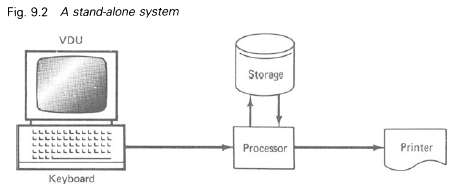
1.2. Shared resources systems
An extension of the basic system just described is one often known as shared resources, where two or more keyboards, VDU and processor installations are linked to one printer which they share. One processor is equipped with a print controller so that work from the work stations can be queued until the printer can deal with it. Such a system makes most efficient use of the printer but does need careful programming to ensure smooth operation. A diagrammatic representation of a shared resources system is given in Figure 9.3.
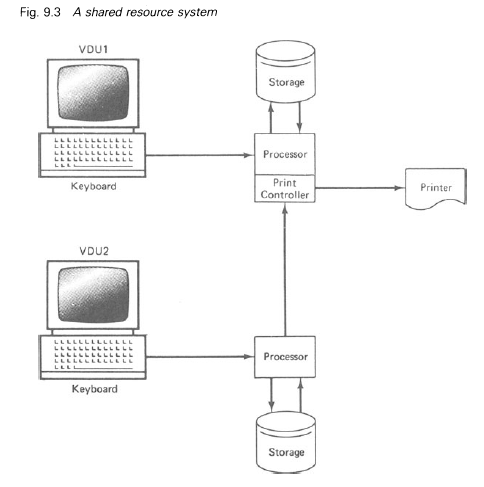
Some stand-alone systems, such as IBM’s Displaywriter, allow work stations to be added as the need arises, in this particular case the maximum being three. Thus a user can start word processing with one station, with minimum outlay, and can add one or two further work stations as demand increases.
1.3. Shared logic systems
Where the volume of work is very high it makes economic sense to utilise a single, larger, processor to serve several work stations. This is known as shared logic. All keyboards and visual display units are interfaced (the computer word for connected) to a single central processing unit (CPU) which is programmed to deal with the work to be input to and output from it and it is serviced by one or more printers as circumstances demand. Storage can be any method according to the size of the installation and the preferences of the designers, but is frequently disc storage using either exchangeable computer disc packs or diskettes (also known as floppy discs). The former have the advantage of high storage capacity without recourse to excessive interchanging whereas the latter have the advantages of being light and easy and quick to interchange. A diagram of a shared logic configuration is given in Fig. 9.4.
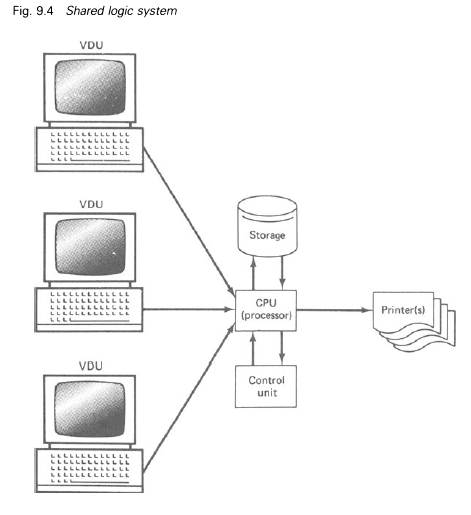
2. Software
Whatever the system of word processor and its configuration of hardware – central processor, keyboard, VDU and printer – and whether integral or separate units, its effectiveness and efficiency depend upon its software. Software is, simply, the programs used, as in computers, to instruct the machine to carry out its required functions. It is usual for the word processor manufacturers to supply programs for their own equipment but there are many independent software houses that also provide programs and much, but by no means all, software is interchangeable between different makes of machine.
Software is the source that instructs the word processor to print in standard format or otherwise, choose the required typestyle and pitch, make corrections, carry out editing, merge texts, justify margins and perform all the other various functions of which the equipment is capable.
3. Information Processing
Since word processing and electronic data processing are so akin it is a logical development that they should be combined where the need arises. In many cases, for instance, data stored in computer files may be required in a text being prepared by the word processing system and time, inconvenience and cost can be saved by having direct communication between the two, so that the word processor has direct access to the data processing files. This is also known as a distributed intelligence system.
As is shown in Figure 9.5 the word-processing processor is connected with the data-processing computer and, by means of the appropriate software (programs), can access the contents of the computer files to find data or information needed for its text. The link can be either by cable or by telephone line using the appropriate equipment. An extension of this is the transferring of communications from one particular word processor to another, or to a computer, many miles away over telephone lines. Since the transference is by electrical impulses direct from the word processor’s memory and not by keystroking, as with the teleprinter, transmission speeds of up to 600 characters per second (or over 7000 words per minute) can be achieved. At the receiver’s end the word processor receives the text into memory and then types it out on command. If communication is to a central computer it will be written into storage and from there on to a file.
It is also possible with some equipment to transmit to teletype machines through the telex network, in which case connection can be made to anywhere in the world at the maximum teleprinter speed of 6.6 characters per second (nearly 80 words per minute).
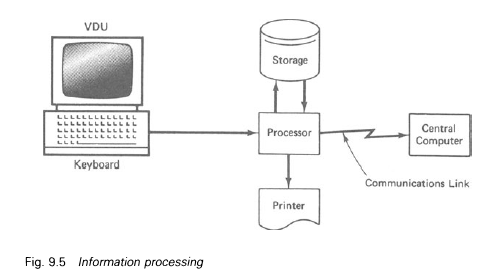
4. What a Word Processor Can Do
At this point it will be useful to summarise the practical points that can be atrributed to word processing.
- It can store texts for repeated reuse as and when required. Storage capacity ranges from a few characters or words in the simplest memory typewriters to virtually limitless capacity in configurations using external storage devices.
- Access to texts or parts of texts is extremely rapid, which enables retrieval to be quick and convenient.
- It is possible to merge parts of different texts together to form new texts. This allows the use of standard phrases and paragraphs in the construction of all kinds of correspondence, contracts and other documents.
- Various typing functions such as tabulation, paragraph indentation, margin justification and so on are performed automatically.
- Alterations to the text, such as editing, insertions and corrections, can be easily carried out without recourse to complete retyping: only the amendments need to be made manually, the acceptable parts of the text (usually the greater portion) being processed at maximum automatic speed.
- Document layout can be amended (the jargon term is reformatted) by a simple keystroke.
- Form layouts can be displayed on the visual display screen to enable variables to be inserted. This is particularly valuable in systems work. Entries are keystroked consecutively and the actual locations on the forms are accessed automatically.
- The facility to change typestyles provides the ability to increase the kinds of jobs that can be tackled, from simple correspondence to sophisticated reports.
- The introduction of ink-jet and laser printing techniques, which obviate the need for ribbon movement and type impact, have phenomenally increased possible automatic printing speeds to ten times that of the average typist.
- The end product is of exceptionally high quality.
- A word processor can communicate with and work in conjunction with a central data-processing computer, as well as with other word processors, given the appropriate installation.
5. Applications of Word Processing
It is easy to be overwhelmed by the possibilities offered by word processing and by the blandishments of the manufacturers. Hence an office administrator with a written communications problem may be tempted to opt for word processing as an answer to this problem though it may not, in fact, be the right solution. It is necessary, therefore, to look at the applications for which this comparatively new technique is best suited.
5.1. Correspondence
There is very little advantage in using word processing for ordinary letters that demand individual treatment. The real gain in this area, if one is to be found, is in a possibly superior appearance to that produced by individual typing though this is by no means always the case.
However, careful appraisal of the usual run of business letters leads to the conclusion that a majority of the phrases and sentences used, even in the most personalised correspondence, are repeated time after time in letter after letter. This being so, routine or semi-routine correspondence can be handled by the word processor very adequately and expeditiously by the establishment of standard paragraphs and statements which are left in memory and called up as and when needed in the order in which they are required. This programmed correspondence, as it is sometimes called, is useful in such routines as replies to sales enquiries, letters to suppliers asking about prices, deliveries and the like, responses to regular customer complaints, requests for payment of accounts and many, many similar communications. The stored phrases and sentences are coded for retrieval and are brought into use simply by the operator keying in the appropriate codes. In this application access to the filed material is random so that the order of presentation can be infinitely variable. Only the variable contents of the letters – for example, names and addresses, product names and so on – need to be typed manually.
5.2. Composite documents
These include such documents as contracts, agreements, legal engrossments, insurance policies, tenders and many others which make use of standard paragraphs. These standard paragraphs are coded, indexed and written into the word processor file from where those needed are recalled and typed in any required order on the command of the word-processor operator.
In the more advanced installations it is possible to produce new documents by taking and reassembling standard paragraphs from other documents already existing on file. In this way documents can be produced very rapidly and without typing errors.
5.3. Standard letters
These were the primary output of the original automatic typewriters. Much correspondence is of an absolutely standard nature – for example, acknowledgements of orders for standard goods, quotations for standard supplies, covering letters for documents of all kinds (for cheques in payment of accounts or settling insurance claims) and so on. Each standard letter needs only its code to be keyed in for it to be typed out automatically and accurately, the variable information such as name, address, the sum involved and the like being typed in manually.
The very great benefits accruing from the use of word processing in these applications are that the finished product is absolutely error-free, the original having been corrected at the time of the initial typing – thus obviating the time-wasting job of checking – and the extreme speed with which the letters and documents are produced. It has been said that one operator with a word processor can produce the work of four typists using conventional machines and methods. The following, more specialised applications, lead to even greater efficiency.
5.4. Reports
Reports, particularly lengthy ones, are usually subject to much editing as the author reads the original typed draft, amends it, reads the amended draft and amends that and so on. In the case of normal typing this means repeated typing of the full amended draft time after time. By using a word processor for this work only the amendments on each edited draft have to be keyed in manually; the parts of the report that are correct (usually by far the major part) are printed out at the maximum automatic speed and, additionally, do not have to be rechecked for typing errors.
5.5. Text editing
The same procedure as adopted for report preparation can be used for any other type of document at the time that it is originated, where corrections and editing are required before final production.
5.6. Updating
All sorts of lists and tables – such as price lists, lists of names and addresses, stock lists and financial and statistical tables – have to be brought up to date from time to time; often the changes are few or minor. In these cases the lists or tables are called up from file, the operator keys in the amendments such as insertions and deletions, and the word processor will print out the revised document. Some advanced installations have the facility to perform arithmetic (a so-called arithmetic capability) and with these the tables containing figures can be automatically totalled column by column,, cross-cast and the results printed in.
5.7. Forms
Much business activity relies on the filling in of forms and word processors can materially assist in this respect. By means of the appropriate program the word processor enables the operator to type the required responses to each item in succession regardless of the position on the form it will ultimately occupy. These entries are checked for correctness by the operator reading them on the visual display unit and then printing takes place automatically, the program taking care of the positioning of the entries on the form.
Quite complicated systems can be put on to the more advanced word processors, enabling the production of multiset forms with information positioned in different places on different forms from the initial, once only, keyed entry. Pre-recorded standard information such as customers’ names and addresses can also be called up and printed. Thus sales order/invoicing routines, production control systems and so on can be accommodated with the resulting speed and accuracy. Hence the divide between word processing and electronic data processing is being bridged in such applications.
5.8. Storage and retrieval of information
Because of the fact that word processors have magnetic storage facilities that can be accessed randomly it is possible to use them as information files. Such uses include personnel records, stock records, registers of shareholders and so on. The means of access depends upon the type of equipment installed, but such applications are quicker in use and take up less space than the equivalent paper records. Here again word processing is approaching the area of electronic data processing.
Having examined the applications for which word processing is most useful we can now summarise its major advantages and disadvantages.
5.9. Advantages
- Repetitive typing can be carried out at something like four times the productivity of a copy typist and is error-free.
- Once the original input has been corrected no further checking is required.
- Corrections can be made before printing takes place on equipment where a visual display is provided. This avoids erasures on the finished work and the time taken to make corrections is very much reduced.
- Amendments, deletions, corrections and editing are very easily carried out both in existing texts and in new input. This is particularly valuable in report work.
- When amendments, deletions, corrections or editing are necessary the unaltered work is printed automatically at the maximum speed of the equipment; only the corrections have to be done at manual speed.
- Depending upon the equipment, stored texts can be restructured in almost any fashion as required. This also applies to statistical and other tables.
- Work appearance is first-class and different type styles are available for different purposes. Most machines have an OCR (optical character recognition) type font that enables the word processor to produce printed output suitable for direct input to a computer equipped with the appropriate reader.
- Keyboards are based on the conventional typewriter QWERTY layout, so-called because the first six letters of the keyboard are just these. This means that although there are many additional function keys (for example, skip, print, insert and so on) a trained typist has minimal difficulty in switching from an ordinary typewriter to a word processor keyboard.
- Many installations have arithmetic capabilities, thus enabling systems to be worked on them that require calculations. Sales order/invoicing systems are a case in point.
- As word processors become more popular in commerce and industry operators responsible for the equipment are gaining status.
With regard to 8 above an attempt has been made to simplify the word processor keyboard by the introduction of the ‘Maltron’ keyboard. This layout is designed to ease the work of the operator in two directions. First, the arrangement of the keys has been altered after careful study so that the most used letters are operated by the strongest fingers and, second, the actual shape of the keyboard has been changed in contour so as to reduce fatigue. It remains to be seen whether this new design will become more successful than other attempts to simplify the typewriter keyboard. These have foundered on the twin rocks of resistance to change and the fact that so many typists are trained and have become expert on the existing layout. In addition, of course, manufacturers have a great investment tied up in the production of the QWERTY keyboard.
5.10. Disadvantages
Though there are overwhelming advantages to be gained from the installation of a word processor in the right circumstances, inevitably some disadvantages will accrue. The most important of these are:
- To some extent much of the communication becomes depersonalised and there is a danger that some correspondence may lack precision because of the inappropriate or thoughtless use of standard sentences and paragraphs.
- Originators of correspondence will have less contact with those who produce their letters and other documents. This can lead to increased errors through misunderstandings and to the feeling of a loss of status by executives and others concerned with originating correspondence.
- A typist transferred from a conventional typewriter, and the environment surrounding the usual typing activity, to a word processor may find the work impersonal and somewhat isolated: this may cause resentment and a feeling of isolation.
- Where there is very much repeat printing from the memory the operator is likely to become bored and hence careless.
- Should there be a breakdown of equipment or power there would be serious disruption of work: much more serious than in the case of conventional typewriters.
- The environment within which the more advanced equipment is required to operate needs careful attention in regard to humidity, cleanliness, the reduction of noise levels and, where visual display units are installed, lighting and glare.
6. Choosing Word Processing Equipment
It cannot be emphasised too strongly that the correct selection of the appropriate equipment is vital for a successful word-processing installation. This means that a careful assessment of the organisation’s needs must be carried out and the feasibility of profitably using word processing established. The approach must be entirely an applications approach with the needs of the user departments paramount, and the blandishments of enthusiastic sales representatives must be critically examined. The office administrator with inadequate experience of word processing should seek the services of expert opinion in this connection either through an independent consultant or through the readily available assistance of consultants from the manufacturers. For all but the simplest of systems the capital investment can be considerable: an inappropriate choice of equipment can be very expensive.
In concentrating on the work to be performed it is easy to overlook the requirements of the operators: such considerations as the height and angle of the visual display screen and the colour and character of its display can be very important. A badly placed screen can cause neckache in the operator as well as produce glare. It is asserted that a screen fixed to the keyboard gives no flexibility in this direction. A display of green characters on a black background is favoured by the majority of manufacturers but many operators find this colour combination tiring to the eyes and screens giving black characters on a white background, reproducing the printed or typed page, are also available as are other combinations.
Before leaving this discussion it must be made clear that word processing cannot undertake the whole of the written communications of an organisation. The areas where individual typing and shorthand-typing are still indispensable must be recognised. These include confidental work, work of particular intricacy and work that is not likely to be repeated. Added to these must be the maintenance of the status of many senior executives though here re-education may be possible.
Finally, throughout this chapter the words type and print, and typing and printing, have been used interchangeably for brevity and clarity: some installations type and some print.
Source: Eyre E. C. (1989), Office Administration, Palgrave Macmillan.
The post Word processing appeared first on HKT Consultant.
]]>The post Dictating machines appeared first on HKT Consultant.
]]>What benefits will the use of dictating machines confer on the users? First, there is the economy of typists’ time. Shorthand, although a skill not easily acquired, is nevertheless only a step in the production of the typed word and it is the typing that is really required. If a shorthand- typist is taking down shorthand notes the typewriter is idle, but if the necessity to write notes is overcome by providing a dictated record from which typing can be done direct then typing output will be considerably increased since the time previously devoted to note-taking is now used for typing.
Second, it is common experience that any period of dictation is subject to many interruptions by the telephone, by callers and so on, during which interruptions the shorthand-writer is often doing virtually nothing at all. The use of dictating machines ensures the maximum time for typing and the wasteful periods of taking shorthand notes and sitting waiting during interruptions are eliminated.
Third, frequently executives wish to dictate when shorthand-typists are not available, during very busy periods or after office hours for example, and dictating machines are always available at any time so that executives can fit in their programmes of dictation entirely to suit themselves. Indeed, many manufacturers provide portable, battery-operated machines that use recording media compatible with standard office machines and this enables the users to dictate in any situation, even in a car if necessary, the records being transcribed on the standard machines in the normal way.
Finally, dictating machines enable the installation of centralised dictating systems, which can bring even greater savings for the typing function.
What, if any, are the disadvantages associated with dictating machines?
First, until accustomed to them, typists do not like them for two main reasons: {a) because where the tpists are shorthand-writers the considerable effort involved in learning shorthand now seems wasted and their speed will decline through lack of practice; and (b) there is a loss of personal contact with the person dictating. In fact, some shorthand- typists will seek other employment where their shorthand is required rather than remain with an organisation that has introduced dictating machines. Fortunately, this situation is becoming less frequent as many younger entrants to offices are now trained in audio-typing instead of, or as well as, shorthand-typing and the machines thus become more acceptable.
Second, the people who originate the dictation frequently dislike the machines because new techniques in dictation have to be acquired and clearer and more detailed instructions have to be given, with less reliance on the typists. In the dictator/shorthand-writer situation a team is at work, any queries and misunderstandings being cleared up during dictation. In addition, executives generally rely on their shorthand- typists to look up pieces of information to fill in gaps in the dictation: this is not so easy with dictating machines.
Third, it is less easy for the users to make alterations in dictation – to delete anything already given earlier or to add material to the earlier part of the dictation. Shorthand-typists can take this in their stride but when recording on a machine an executive has to follow a proper procedure for alterations, which some find irksome, or else it is necessary to prepare dictation much more carefully beforehand. It could be said here that the saving of typists’ time in this event may mean a loss of executives’ time, with a consequent reduction in the economy promised.
Lastly, there is the possibility of electrical or mechanical breakdown, which means that no dictation can be given until the breakdown is rectified unless there is a back-up of battery-operated machines. Such a breakdown will cause interruption and dislocation of work.
1. Uses of Dictating Machines
The original, and most obvious, use of dictating machines was for ordinary commercial correspondence. However, they are now employed in many diverse ways among which are the following:
1.1. Conferences and meetings
Some organisations use machines instead of shorthand-writers to record the business carried out at meetings, and it can be said that there is no fear of wrong reporting in this case. However, two difficulties arise which should be considered:
- Speakers do not give their names each time they make a contribution and there may be difficulty in identifying them from voices alone.
- The recording will be as long as the meeting, which means that editing for writing up minutes and reports is a lengthy business. An experienced shorthand-writer, on the other hand, will omit irrelevant matter and, depending upon his or her status, may even partially edit or abbreviate as the notes are taken. In addition, of course, there is no difficulty in identifying the speakers.
1.2. Sales reports
A great deal of sales representatives’ time is taken up with writing reports each day as well as writing up orders. The provision of dictating machines, especially portable ones, enables reports and orders to be dictated and posted to the office for transcription, which saves a great deal of time and allows the representatives to spend more of their time on their proper job of selling.
1.3. Internal memoranda
Typists’ time can be saved if memoranda not requiring copies are dictated on to a machine and the recording itself passed on.
1.4. Staff training
Voice and speech training for receptionists and salesmen can be assisted by the use of dictating machines. Mock sales interviews, for example, can be recorded for subsequent analysis in sales training.
1.5. Stock-taking and similar activities
Wherever notes have to be taken in inconvenient situations – for example, taking stock in warehouses, measuring work on building sites, examining plant and so on – it is very much easier to use a portable dictating machine and a pocket microphone than to write down notes. It is also more convenient for the typist because most notes taken under such conditions are badly written and hard to decipher: sometimes they are also dirty and not too pleasant to handle. In addition, the job can very often be done by one person instead of two when a dictating machine is used in these circumstances.
2. Selecting a Dictating Machine
It is most essential that, when choosing a dictating machine, the office administrator looks very carefully at the kind of medium used and the facilities and controls provided, examining them in relation to the work the machines will be engaged upon. The points to be considered may be summed up as follows:
- How long is the normal recording going to be? Machines divide themselves into those using magnetic tape which can accept long recordings and those using discs where the length of recording is limited. Reports and similar matter sometimes require long periods of dictation and tape may be preferred to save the constant changing of the recording medium that would be required if discs were used. On the other hand, if the individual pieces of dictation are short – letters, for example – constant feeding of material to the typists will be an advantage.
- Is portability important?
- Is compatability between existing and proposed new equipment required? (this is normally desirable) and, particularly, between any portable machines and the office machines?
- Is it desired to send the recordings through the post?
- Is the machine required for recording and transcription, or for transcription only? Some manufacturers offer the latter for use by the typists and these are usually less expensive than the dual-purpose machines, with the further advantage that the recordings cannot be interfered with.
Properly and intelligently used, the dictating machine can deal with most dictated material but there are some areas where the services of a shorthand writer will still be preferred. Confidential work, or work of unusual complexity such as highly technical dictation, is better done by a shorthand-writer, especially on a personal secretary basis. The taking of notes at meetings and conferences is also a task still more suited to shorthand.
Finally, the value of a machine can be questioned when the bulk of a secretary’s work is that of a personal assistant, including composing replies to letters, where the actual taking of dictation is a very small proportion of the work.
3. Centralised Dictation
In Chapter 9 it was pointed out that the establishment of a typing pool facilitated the installation of centralised dictation. This involves the use of dictating machines by remote control so that originators of dictation can record their dictation directly on to machines in the typing pool without either the authors or the typists leaving their work stations. Contact with the recording machines can be by independent wiring and switching arrangements or through either the normal internal telephone circuits or those of the external telephone. Each has its advantages and disadvantages.
The merit of an independent installation is that it does not interfere at all with ordinary telephone usage, but on the other hand it is the most costly form because it requires its own wiring and switching equipment.
An installation on the private internal telephone circuit avoids some expense for wiring and the cost of an independent switching circuit but entails some interference with the verbal internal telephone system whilst dictation is taking place unless the system itself is enlarged.
Connection through the public telephone circuitry has much to commend it as it uses the standard facilities already installed and, further, enables dictation to be fed into the centralised system from outside: this is very valuable for travelling executives who can dictate correspondence and reports from a distance, and these can be typed ready for the author’s return to the office.
The choice of method can be made only on consideration of all the requirements of the potential users.
In all cases the authors’ microphones are equipped with call, start and stop facilities as well as playback. In other words, dictating on a remote dictation system is very little different from using an individual machine once the author has become accustomed to the physical absence of the machine. The provision of a hand-set similar to a standard telephone rather than the special microphone used with individual machines helps to make the exercise more familiar.
For the typing pool itself two systems are available, the multi-bank method and the tandem method. In the multi-bank system all the recording machines are grouped together under the control of the supervisor who distributes the recorded material to the members of the typing pool as required. This may be because the record is full, because a typist or typists need work to do or because some priority work needs urgent transcription. The typists themselves have their own machines which they use for transcription and in some makes these may be machines that can only play back and cannot record, which usually means some saving in the capital cost of the equipment. This method requires a high level of supervisor attention to make the most economic use of the installation and of the typists’ time. It also has the disadvantage that the dictator has no direct contact with the typist who is transcribing the work (the reverse is also the case), all queries and directions going through the supervisor.
The tandem method entails each typist having two machines, both of which record and play back. Authors dictate direct on to one machine whilst the typist transcribes from the other. In this way the typists are constantly fed with work and do not have to rely on distribution by the supervisor, a practice that can lead to some waste of time. In addition, it is usual for there to be telephone communication facilities direct between the typist and author, thus providing useful contact and facilitating queries and special instructions. The chief disadvantage of this system is that of cost since more machines and circuitry are required. It would, perhaps, be true to say that the multi-bank method is preferable where reasonably straightforward work is involved whereas the tandem method is to be preferred where more complicated or specialist work is entailed. The advantages of centralised dictation may be listed as:
- It is economic of machines and labour. It is estimated that six dictators can be served by one machine.
- It is possible, with proper supervision, for the transcription work to be distributed amongst the typists in the most equitable manner.
- It extends even further than ordinary centralised typing the effective establishment of work measurement and the provision of bonus incentives.
Among the disadvantages that may appear are the following:
- A depersonalisation of the author/typist relationship occurs, particularly in the multi-bank system. No face-to-face contact between the parties is necessary and rarely happens.
- Typists can feel cut off from the life of the organisation.
- They are also liable to become bored because of the lack of variety in their duties: they need never even leave their desks in the course of their work.
- Dictators, too, feel cut off from those who type their work.
4. Hints for Giving Dictation
Before leaving the question of dictating machines it is relevant to give some guidance on the question of dictating on to them.
- Be sure to have all relevant papers to hand and in order before starting dictation. It is helpful to jot down the points to be made on letters and so on being replied to.
- At the start of dictation give your identity clearly.
- Before each piece of dictation give precise instructions as to the number of copies required, type of paper, style (for example, double spacing) if necessary, whether a special size envelope is needed for enclosures and any other relevant details.
- Speak clearly and distinctly and do not drop your voice unduly at the ends of sentences.
- By experiment establish the best distance between your mouth and the microphone and try to keep this standard. The most effective volume for speaking should be established at the same time and this should be kept even.
- If it is necessary to stop dictating momentarily, perhaps to collect your thoughts, to find a piece of necessary information and so on, stop the machine from running: remember the typist will have to sit through the silence and so will waste time if this is not done.
- Indicate clearly on the record slip any alterations as well as on the recording: remember, unless you do this the typist will probably type the incorrect passage before hearing the amendment. On magnetic material, of course, it is usual to return to the last correct passage and record over. However, even here later alterations will have to be dealt with specially, as mentioned, because it would be time wasting to re-record over subsequent long, correct passages, to make an alteration.
- Indicate clearly the beginnings and ends of items. These should also be marked on the record slip.
- Give spellings of unusual or difficult words or names, using a phonetic alphabet where necessary such as ‘A for alpha’ and ‘B’ for bravo’, etc.
- Figures should have special attention. Five and nine can be easily confused, as can seven and eleven, unless very clearly enunciated. Consonants should be overstressed as, for example, Tife’ for ‘five’.
- The question of punctuation sometimes arises. Where the typists are well trained and are of a high calibre it is rarely necessary to dictate punctuation except for indicating new paragraphs. In fact, the constant interjection of punctuation instructions can be distracting for both the typist and the author. On the other hand, (a) where some special reason requires quite specific punctuation or (b) where the typists are not competent to use their own judgement in this respect, then punctuation must be dictated. There is much division of opinion on this matter. However, it never does any harm to indicate full stops.
- The finish of the entire dictation session should be indicated, with any instructions required if non-standard, such as the special distribution of carbon copies, enclosures to be included with a letter and so on.
Source: Eyre E. C. (1989), Office Administration, Palgrave Macmillan.
The post Dictating machines appeared first on HKT Consultant.
]]>The post Reprography appeared first on HKT Consultant.
]]>1. Spirit Duplicators
This is probably the simplest method of duplication where less than 250 copies are required and where quality of image is not important. It makes use of a hectographic carbon master image and masters can be originated by hand or typewriter, as well as by thermal photocopiers. This last feature is useful where a suitable original exists and avoids the necessity to recreate the original in master form.
A very important aspect of this system is its ability to reproduce up to seven colours in one run, which is useful for such jobs as the reproduction of statistical tables and graphs where colours are an advantage.
Many of the machines are quite versatile, which encourages the use of this method in office systems such as invoicing, sales procedures, production control and others. Some of the equipment is fitted with a line selection device which enables the operator to duplicate only selected lines from a master, even further facilitating the use of this method in office procedures.
2. Stencil Duplicators
Although being severely challenged by the modern volume-production photocopier, the stencil duplicator is probably the most widely used and best known office duplicating machine, giving up to 5000 or more good copies from a single master. Its name describes it accurately since it makes use of stencils cut into thin plastic skins. This can be done by hand, by typewriter and, where a suitable original already exists, by electronic stencil cutter or thermal photocopier. When properly operated this method produces excellent copies. It is sometimes called an ink duplicator.
It should be mentioned that though still available both spirit and stencil duplicators are becoming obsolete in favour of plain paper photocopiers, described under ‘Electrostatic copying’.
3. Offset-litho Duplicators
Offset-litho printing, based on the antipathy of grease and water, has been in use in the printing industry for very many years and the development of small, easy-to-operate machines for office use has led to its increasing popularity for office duplicating. Very long runs of quality equal to print are possible with this method. The best metal masters will produce up to 50 000 copies, but cheaper masters can be used for short runs: paper ones will produce 500-900 copies, for example.
Besides being produced by hand or typewriter, masters can be produced by photocopying or photographically so that intricate originals, including photographs, can be reproduced. It is possible to produce almost all the office printing on offset-litho within the office itself with a significant saving in printing costs. Used in conjunction with a typewriter with variable type styles and possibly a photo-composing machine and a photocopier, this type of duplicator can cope with quite advanced printing jobs such as forms, letter-headings and even sales brochures. Where facilities are not posssessed for making complicated master plates these can be produced by specialist service bureaux at reasonable cost.
4. Automatic Typewriters and Word Processors
Details of these machines will be found in Chapters 8 and 9. They are mentioned here as a reminder that they are essentially a form of duplicator and are much used to produce duplicated matter that has the appearance of being individually typed.
Equally, it must be remembered that they are also capable of many applications not possible with a standard duplicator, some of which have been described in the relevant chapters.
5. Addressing Machines
Not all the duplicating in an office consists of numerous copies from one original at one time. Frequently the requirements is for one or two copies only from each of many masters, such as envelopes in a direct mail sales campaign, at regular or irregular intervals. This office problem is dealt with mechanically by the addressing machine.
There are three types of masters used in addressing machines:
- Metal plates for considerable usage. These have the drawback of needing a special embossing machine for their production, though specialist bureaux will undertake this work.
- Stencils, for constant use. These are easily typed on normal typewriters.
- Spirit masters. These are easily typed but have a relatively short life.
Applications
In addition to their addressing function, addressing machines are used in systems work. This is made possible by provision on the more advanced machines for:
- Automatic plate selection for printing, where specific plates can be skipped as necessary.
- Line selection where selected parts only of a plate or plates are reproduced.
- Repeat facilities.
- Listing devices.
Among the applications to which addressing machines are put are:
Notices of meetings. Heading up pre-printed notices, proxy forms and so on.
Wages procedures. Wages bags, payroll sheets and so on in conjunction with the line selection device.
Invoicing: Customers’ names and addresses, prices and extended product descriptions and similar information are kept on plates which are pulled and printed as required.
Credit control. Inter-store credit cards are an example, as are Visa, Access and American Express credit cards.
These are just a few of the applications to which addressing machines are put, but there are many more in connection with production control, stores control and similar procedures. In fact, the term ‘addressing machine’ is a misnomer and this equipment is amongst the most versatile available to the office administrator. Nevertheless, much of the work previously done by addressing machines is being taken over by the computer, particularly in the fields of listings and envelope-addressing despite the facts that computer usage is probably more expensive and amendements are less easy to put into effect.
6. Photocopying
Photocopying may be defined as ‘the reproduction of an exact copy of an original by the action of light, heat or electrostatic charge’. Despite the use of the word ‘exact’ it must be understood that few office photocopying processes offer the reproduction of coloured originals in colour, but only in terms of black and white.
Within a comparatively short space of time photocopying has become one of the most used aids in the office and before considering the various methods the reasons for its popularity must be examined. There are three significant advantages in the use of photocopying:
- Accurate copies are produced quickly and, most important, they need no checking because there can be no copying errors, as can occur when duplicating masters are typed. Where only a few copies are required, therefore, it is generally cheaper and quicker to produce them by a suitable photocopying method.
- Most methods lend themselves to systems work and will produce masters for some types of duplicating.
- Drawings, graphs and, in some cases, photographs can be copied direct from the original.
The disadvantages of photocopying may be said to include:
- Except for dyeline (explained later) photocopying is mostly suitable only where a few copies of an original are required, owing to cost. It must be recognised, however, that competition is forcing down the cost per copy and the system of making sliding-scale charges according to the volume of copying done where machines are rented tends to increase the numbers of copies produced. Further, in the field of electrostatic copiers modern developments in plain paper copiers have produced machines that can cope with very long runs and provided the volume of copies is not too large the cost per copy can compare quite favourably with conventional stencil duplicating.
- The copies produced by some methods may not be permanent, though this depends largely upon correct procedure and subsequent handling.
- There is a tendency {a) to make copies unnecessarily because it is easy and (b) to use the copier for more copies from an original than is economical, when some forms of duplicating – or even carbon copying – would be cheaper. This is, of course, a human failing rather than a technical one.
7. Photocopying Methods
Photocopying had its origins as long ago as 1839 though it was not developed seriously for office use until after the Second World War. At first all the methods available were based on purely photographic techniques requiring photosensitive paper and wet development. Such methods are the reflex, diffusion transfer and direct positive processes. These have become largely obsolete because of significant disadvantages compared with modern methods. One ‘wet’ method does, however, still retain support: this is dyeline, which lends itself to many applications especially in the field of office systems. As the oldest of the processes in current common use it is fitting that this should be examnined first.
7.1. Dyeline
This was originally used in drawing offices, where it replaced the old ‘blueprint’ and its application to office routines was comparatively slow. It is a cheap method of photocopying but has the drawback that it requires transparent or translucent originals. This in turn means that it can be used to copy only single-sided originals. To overcome the first problem some paper manufacturers have introduced paper that has the appearance of good quality bond, being visually opaque but quite transparent to ultraviolet light, which is the light used for dyeline printing.
7.2. Thermal (or infra-red) copying
Thermal copying is a process that uses heat instead of light to form the copy image, a special heat-sensitive copy paper being employed. It is very rapid (four seconds to produce a copy) and completely dry. The copies are delivered direct and ready for use. Its principal drawback is its inability to copy original images unless they have a carbon or metallic content and it will not reproduce from most colours as they are composed of vegetable pigments or dyes. These include most writing inks, ballpoint pen inks and coloured printing inks. Thus a great range of documents cannot be copied by this process. Other disadvantages are the cost of the special paper and its fragile nature.
7.3. Dual spectrum copying
This process, introduced by the originators of thermal copying, appears to have been developed to overcome the colour-blindness of the thermal method. It is termed ‘dual spectrum’ because it makes use of both ultra-violet and infra-red light.
Its advantage over the thermal process is its sensitivity to all types of image, whatever their nature or colour. However, it is even more expensive than thermal copying and, since it is a two-stage process, it is very much slower. The average copy takes between 30 and 45 seconds. It is, nevertheless, acceptable to small offices where the copying requirements are low as the capital outlay for the machine is quite small.
Both thermal and dual spectrum copying are rapidly becoming obsolete in the face of competition from plain paper copiers. However, they still have their place in small offices where capital cost is an important consideration and copying needs are very light.
7.4. Electrostatic copying
This process is completely different from the methods previously described. Technically it is based on the fact that when a light-sensitive conductor is charged with static electricity the charge can be dissipated by exposure to light in proportion to the intensity of the light falling upon it. The charge remaining will attract ink (technically called a toner, which may be a dry powder or a fluid), so providing a copy image. Though this sounds a lengthy and complicated process the various stages are, in fact, carried out automatically and at electronic speeds. Small machines will produce eight to nine copies per minute whilst the most expensive machines, costing many thousands of pounds, can produce 120 copies per minute. These expensive machines are, in fact, duplicators and are used as such.
The usual term used for the electrostatic process is xerography, after the firm which pioneered the method, but it is important to be aware that electrostatic copying has developed along two different lines. The first, the Xerox and similar machines, uses a selenium drum or plate to receive the static charge and the inked image ultimately formed is transferred from this to the copy paper, which is an ordinary bond paper. Such machines are now commonly known as plain-paper copiers.
The second line of development uses special coated copy paper which, itself, receives the charge and on which the final copy image is formed. These ‘direct’ copiers are now usually called electrostatic copiers even though the electrostatic process is common to both.
The chief advantage of both these methods is that they are fast and dry. Other advantages include the ability to copy colours and, to a limited extent, photographs. There is, theoretically, no limit to the number of copies obtainable from an original because the whole cycle is performed for each and every reproduction. However, in practice rests should be given some machines otherwise they tend to overheat (the same remarks, incidentally, apply to thermal copiers). A further important advantage is that most machines will produce offset-litho masters and with some of the direct method ones the normal copies themselves can be used for short-run offset-litho duplication.
It would be pertinent at this juncture to outline the differences between the plain-paper copiers and the electrostatic machines. The first and, perhaps, the most important distinction for the office administrator on a limited budget is that the capital cost of the electrostatic copier is very much lower than that for its plain-paper counterpart: in fact, the cheapest electrostatic model is less than a quarter of the price of the equivalent plain-paper copier.
On the other hand, the coated copy paper needed for electrostatic machines is considerably dearer than plain paper, and the copies produced, whilst as sharp as plain-paper copies, are much less white, are thicker and less easy to handle. A good plain-paper copy is of excellent quality – good enough, in fact, to be used in place of ordinary typing even where the highest-quality work is required. The electrostatic machines also tend to produce fewer copies per minute than plain-paper copiers, and can in no way reach the phenomenal quantities of the fastest plain-paper copiers.
It must be said, however, that the electrostatic copier, despite its substantially lower capital cost, has become obsolescent and the field is now held by the plain-paper copier, of which there is a very wide choice. Many modern plain-paper copiers offer additional facilities beyond mere copying, among which are double-sided copying, copying in colours other than black, sorting (usually with add-on equipment), enlarging or reducing the copy image and multicopying from one original by simple dialling or keying-in.
8. Photostat and Microfilming
So far only photocopying processes producing a same-size image have been discussed and this is generally what is meant by the term ‘photocopying’. However, mention must be made of methods which produce copies of different sizes from the originals.
The best known of these is Photostat, a term loosely used for all kinds of photocopying but properly used only for the special process of making copies mainly of a different size from the original. The Photostat process (Photostat is a trade name belonging to Kodak Limited) entails the use of a camera and a darkroom and is, therefore, expensive in equipment and needs a trained operator. Thus, it is used only for specialist purposes outside the ordinary run of office copying. The process is entirely photographic, using paper negative materials, but much of the operational procedure is automatic, unlike normal photography.
The second process is known as microfilming and, again, requires special, expensive apparatus including a camera and viewing equipment.
Considerable reduction in copy size is the aim here, and as it is used mainly in filing procedures will be discussed under that heading.
Before leaving this topic mention must be made of a trend in the design of plain-paper copiers. A feature now available is the ability to provide copies of a reduced size from the original. The object is to unify the sizes of copies for filing so that over-size originals can be copied to a size suitable for standard filing arrangements. This can be a useful feature, as oversize papers do frequently pose filing problems. It should be mentioned that certain Xerox machines have always been available that will enlarge or reduce copies, but these are special-purpose machines far too sophisticated for ordinary office use, whereas the trend mentioned concerns office machines specifically, the equipment being no more complicated than the usual form.
9. Selecting a Machine
There are no hard and fast rules in selecting photocopying machines but regard must be paid, as always, to the work the machine is intended for. Some questions may be put, such as:
- Is image quality important?
- Will multiple copies be required?
- Is it necessary to copy colours?
- Will any control be possible over the type of image to be copied or will copies be required of anything that comes?
- Will only the occasional copy be required or will hundreds or more a week be wanted?
- Will the photocopying be centralised or distributed about the premises?
- Is it intended to fit photocopying into a system?
10. Applications of Photocopiers
Photocopying finds itself playing roles which were not imagined some years ago and thus very careful consideration must be given to machine selection. A few applications by way of illustration may be helpful:
- Dyeline used to produce month-end statements of account from translucent machine ledger cards. Benefits are less paper to file during the month and no necessity to head up statements. The latter advantage is a particular saving where balanced-off accounts do not ‘move’ during the month.
- Almost any method used to copy incoming letters which need attention by two or more departments, so that each department can have sight of the communication at once instead of waiting for the physical circulation of the original. Benefit is that queries are more quickly dealt with.
- The production of offset-litho plates for duplication of reports and so on, so avoiding the expense of retyping.
- Using the strip index method, producing price lists where there are frequent price changes. Strips are changed when required and photocopied, either to produce translucent masters for dyeline, or offset- litho plates for duplicating.
- The production of offset-litho plates for running off leaflets and brochures, where these have had originals prepared by one of the suitable typewriters already discussed in Chapter 8, possibly in conjunction with a photo-composing machine and, perhaps, with photographic inserts.
- As with some stencil duplicators, some photocopiers permit the selective reproduction of matter from a master, using what are called overlay devices. This allows a common master to be used to produce different forms with some common content. It is particularly useful for those engaged in the export trade where the use of aligned forms, as they are called, allows advantage to be taken of these devices.
These are only a few of the applications to which photocopying has been put and the choice of machine or process will depend very largely upon the kind of applications envisaged.
Source: Eyre E. C. (1989), Office Administration, Palgrave Macmillan.
The post Reprography appeared first on HKT Consultant.
]]>